AI-Retail-Distribution-Automation-System
🌟 Project Description: AI Retail Distribution Automation System
This AI Retail Distribution Automation System represents a comprehensive, end-to-end workflow solution engineered to revolutionize traditional retail operations and achieve maximum operational efficiency.
By establishing a seamless, fully automated pipeline connecting Customer Chat Platforms (e.g., WhatsApp), Google Sheets for Centralized Data Storage, and Email Communication, the system autonomously manages the entire Order-to-Cash cycle (O2C).
Core Functional Pillars:
The robust automation framework is built around five critical operational areas:
- Intelligent Order Processing (Step 01-02):
- Leverages cutting-edge AI Chat Models (e.g., Gemini) for automated, non-structured order intake.
- Ensures instant Invoice Generation and seamless order data validation.
- Optimized Logistics and Dispatch (Step 05-07):
- Manages dynamic Daily Dispatch Workflows and scheduling.
- Enables real-time Delivery Status Tracking via structured forms.
- Implements exception-based alerting for late deliveries, minimizing operational risk.
- Proactive Inventory Management (Step 03-04, 09-11):
- Enforces automated purchasing triggered by Reorder Levels (ROL).
- Conducts systematic checks for Stock Expiry and identifies Slow-Moving Inventory (Dead Stock).
- Guarantees optimal stock holding and significant reduction in stock loss.
- Financial Control and Reconciliation (Step 12-13):
- Automates accurate Daily Payment Reconciliation.
- Generates prompt P&L (Profit & Loss) Reporting.
- Dispatches proactive reminders for Overdue Payments, securing cash flow.
- Personalized CRM and Revenue Generation (Step 14-17):
- Drives revenue growth through highly Tailored Marketing Campaigns (e.g., personalized discount offers).
- Establishes an instant, integrated Customer Feedback Loop to continuously enhance service quality.
Impact Statement:
This robust automation guarantees maximum operational efficiency, minimizes manual errors, reduces stock loss, and significantly enhances the overall Customer Experience, positioning the company for scalable growth.
🎥 Project Demonstration & Overview
▶️ Watch the Complete Demonstration Video Here (Retail Automation System)
📚 Table of Contents
A professionally structured overview for quick navigation across the 17-step Automated Retail Distribution System.
- 🧰 Tools & Technologies Used
- 🚀 Key Features & Detailed Workflow
- 2.0. System Interfaces and Context Setting
- Access Control Logic
- Centralized Portal Access (Home Page)
- Customer & Order Interface (Public View)
- Management & Analytics Portal (Admin View)
- 2.1. 🛒 Smart Customer Ordering & Invoicing (Steps 01-02)
- Step 01: Customer Order via Chat
- Step 02: Invoice Process & Email to Customer
- 2.2. 🏭 Automated Purchasing & Inventory Alerts (Steps 03-04)
- Step 03: Purchase Order (PO) and Supplier Communication
- Step 04: Expiry Stock Alert System
- 2.3. 🚚 Daily Dispatch & Delivery Tracking (Steps 05-07)
- Step 05: Daily Dispatch and Customer Notification
- Step 06: Delivery Status Monitoring and Alert
- Step 07: Delivery Confirmation and Final Customer Notification
- 2.4. 💡 Inventory & Financial Intelligence (Steps 08-13)
- Step 08: Sales Analysis and Stock Register Enrichment
- Step 09: Automated Reorder and Purchase Order Generation
- Step 10: Dead Stock and Slow-Moving Inventory Alert
- Step 11: Payment Register Reconciliation and Due Date Setting
- Step 12: Overdue Payment Alert and Follow-up
- Step 13: Monthly Financial Reporting (P&L and Stock Valuation)
- 2.5. 💖 Personalized CRM & Marketing (Steps 14-17)
- Step 14: New Product Launch Communication
- Step 15: Proactive Clearance Discount Campaign
- Step 16: Personalized Customer Retention Campaign
- Step 17: Automated Customer Feedback Loop
- 2.0. System Interfaces and Context Setting
- ⚙️ Credentials and API Configuration
- 3.1. Google Cloud Project Setup (Prerequisite)
- 3.2. Google Sheets and Forms Integration
- 3.3. Gmail / Email Dispatch Service
- 3.4. Google Gemini Chat Model
- 💰 Project Cost Estimation (Monthly)
- 💡 Project Conclusion
1. 🧰 Tools & Technologies Used
This project is built on a robust, integrated stack, detailing the function of each technology within the 17-step workflow.
| Tool / Technology | Primary Function in Workflow (Relevant Steps) |
|---|---|
| n8n Automation | Core Orchestration for all 17 steps, managing triggers, logic flow (ROL, P&L calculation), and data routing. |
| Google Sheets | Centralized Database for ALL data (Orders, Sale & Purchase Register, Stock Register, Dispatch Sheet, Payment Register). (Steps 1, 3, 5, 8, 11, 13) |
| WhatsApp API / Chat | Input/Output Interface for Customer Ordering (Step 1), Supplier PO Confirmation (Step 3), and Logistics Confirmation. |
| Google Gemini Chat Model | Intelligent Parsing of customer chat messages to capture order details accurately. (Steps 1, 3) |
| Email Automation (SMTP/Gmail) | Communication Engine for sending Invoices (Step 2), POs (Step 3, 9), Dispatch Notifications (Step 5), Alerts (Steps 4, 6, 10, 12), and Reports (Step 13). |
| Form Builder (Google Forms/Website) | Data Capture Interface for the Delivery Man to confirm status (Delivered/Returned) (Step 7) and Customer Feedback (Step 17). |
| CRM & Segmentation Logic | Sales/Marketing Intelligence for segmenting customers based on sales history ($\ge$ 1000) and recency to deliver personalized offers and urgency messaging. (Steps 14, 15, 16) |
| Invoice Generator | Document Creation for automatically generating and attaching professional invoices. (Step 2) |
| Inventory Logic | Business Intelligence for calculating ROL checks, slow-moving inventory, stock age, and P&L figures. (Steps 4, 8, 9, 10, 13) |
2. 🚀 Key Features & Detailed Workflow
2.0. System Interfaces and Context Setting 🔐
To ensure data security and operational focus, the portal implements Role-Based Access Control (RBAC). The interface dynamically adjusts based on the user’s login credentials.
👥 Access Control Logic
| User Role | Authentication | Accessible Tabs | Purpose |
|---|---|---|---|
| Customer / Guest | Email Registration | Home, Orders, Contact | Placing orders, tracking personal history, and support. |
| Owner / Manager | Administrative Login | Dashboard, Inventory, Live Tracking, Orders | Full system oversight, financial audits, and supply chain management. |
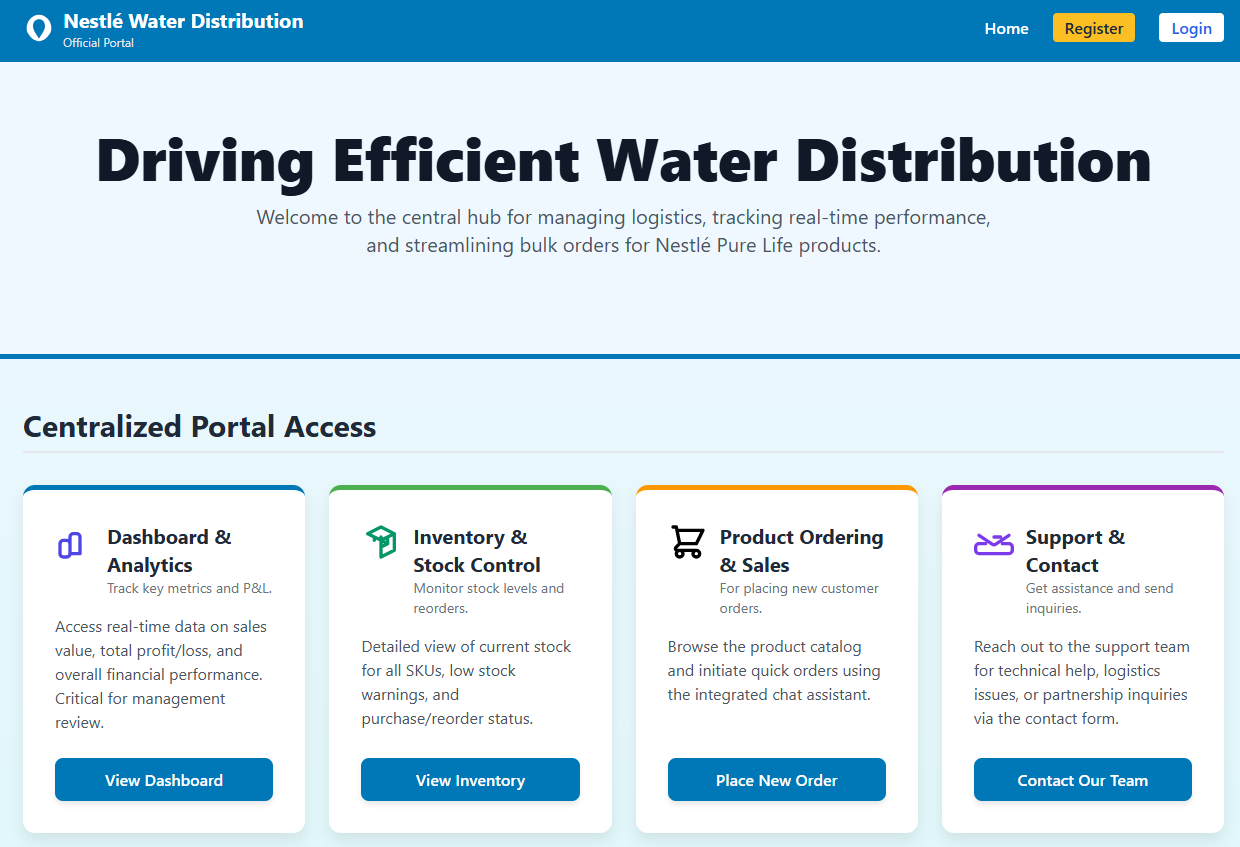
🏠 Centralized Portal Access (Home Page)
The Home page serves as the gateway. While all users land here, the navigation bar and action cards are filtered based on the authenticated role.
| Feature | Role Access | Corresponding Workflow |
|---|---|---|
| Dashboard & Analytics | 🔑 Admin Only | Inventory & Financial Intelligence (Steps 08-13) |
| Inventory & Stock Control | 🔑 Admin Only | Automated Purchasing & Inventory Alerts (Steps 03-04) |
| Product Ordering & Sales | ✅ All Users | Smart Customer Ordering & Invoicing (Steps 01-02) |
| Support & Contact | ✅ All Users | Personalized CRM & Marketing (Step 17) |
🛒 Customer & Order Interface (Public View)
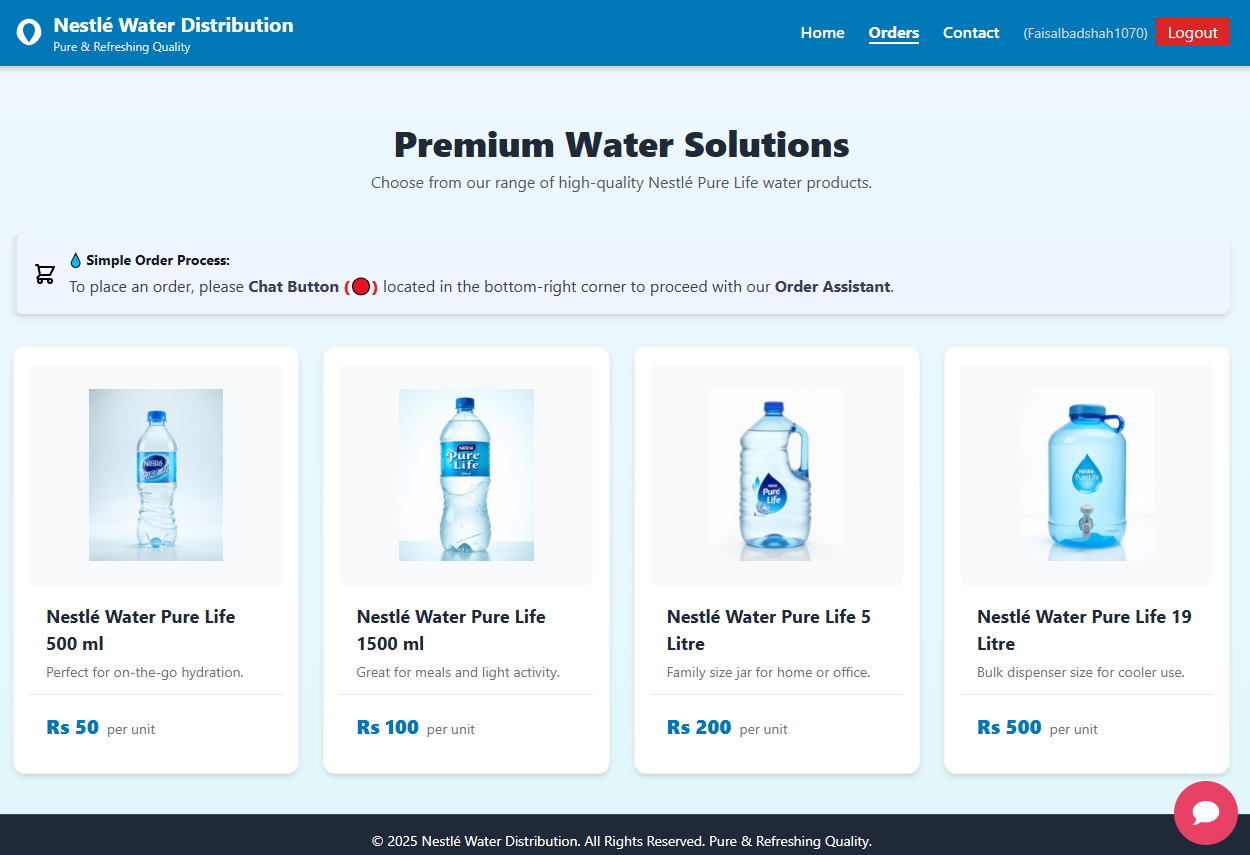
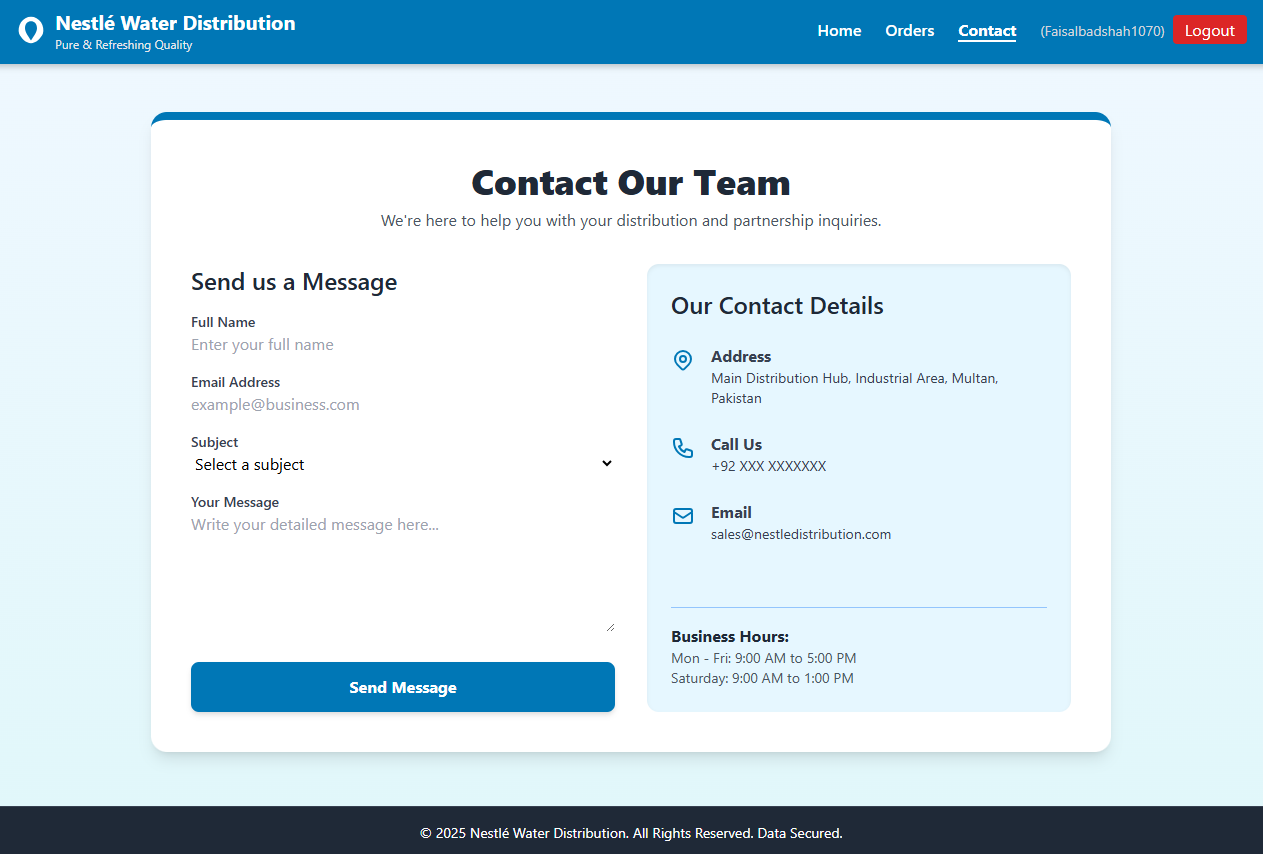
Once a customer registers via email, they are guided to a simplified view focused on procurement.
- 📦 Orders Tab: Allows users to browse the catalog and initiate the AI Chatbot.
- 📩 Contact Tab: For partnership inquiries or support tickets.
📦 Orders Tab
📩 Contact Tab
🏭 Management & Analytics Portal (Admin View)
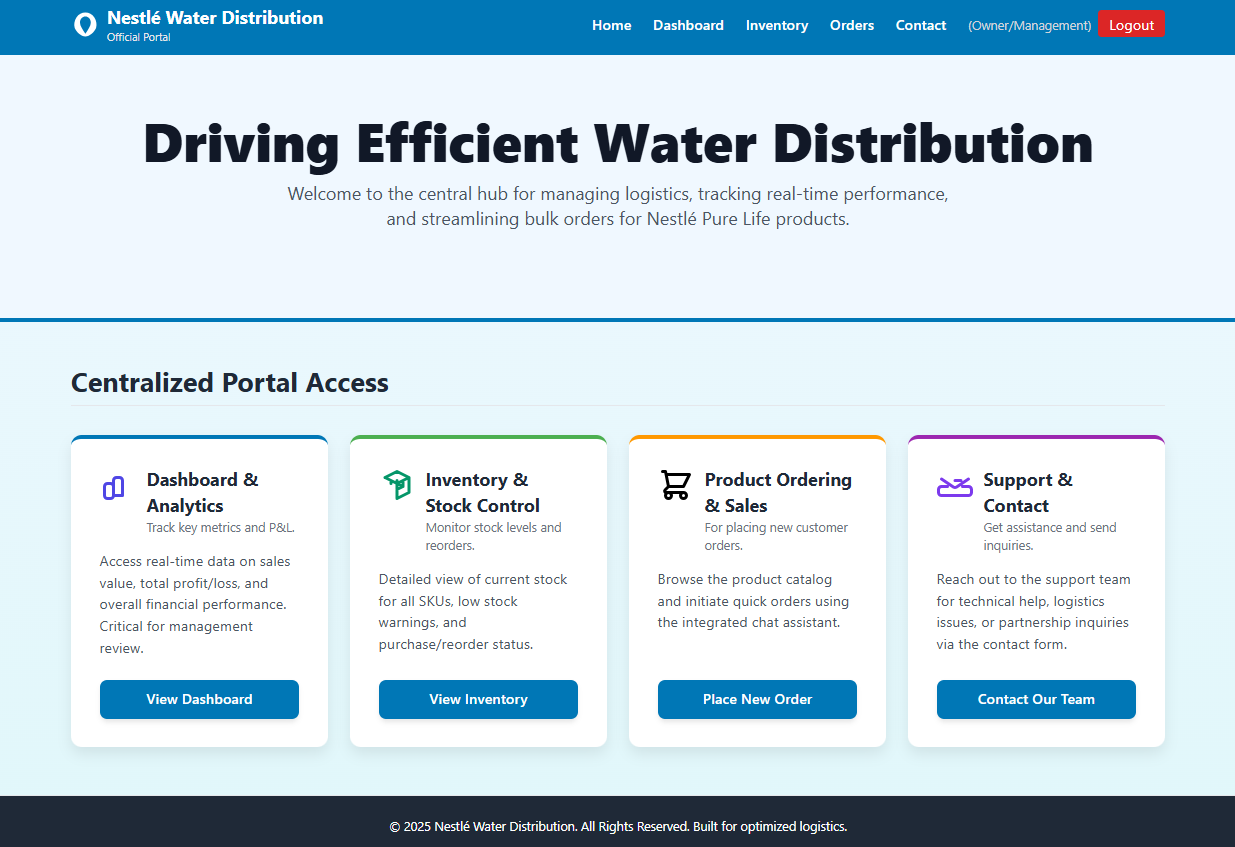
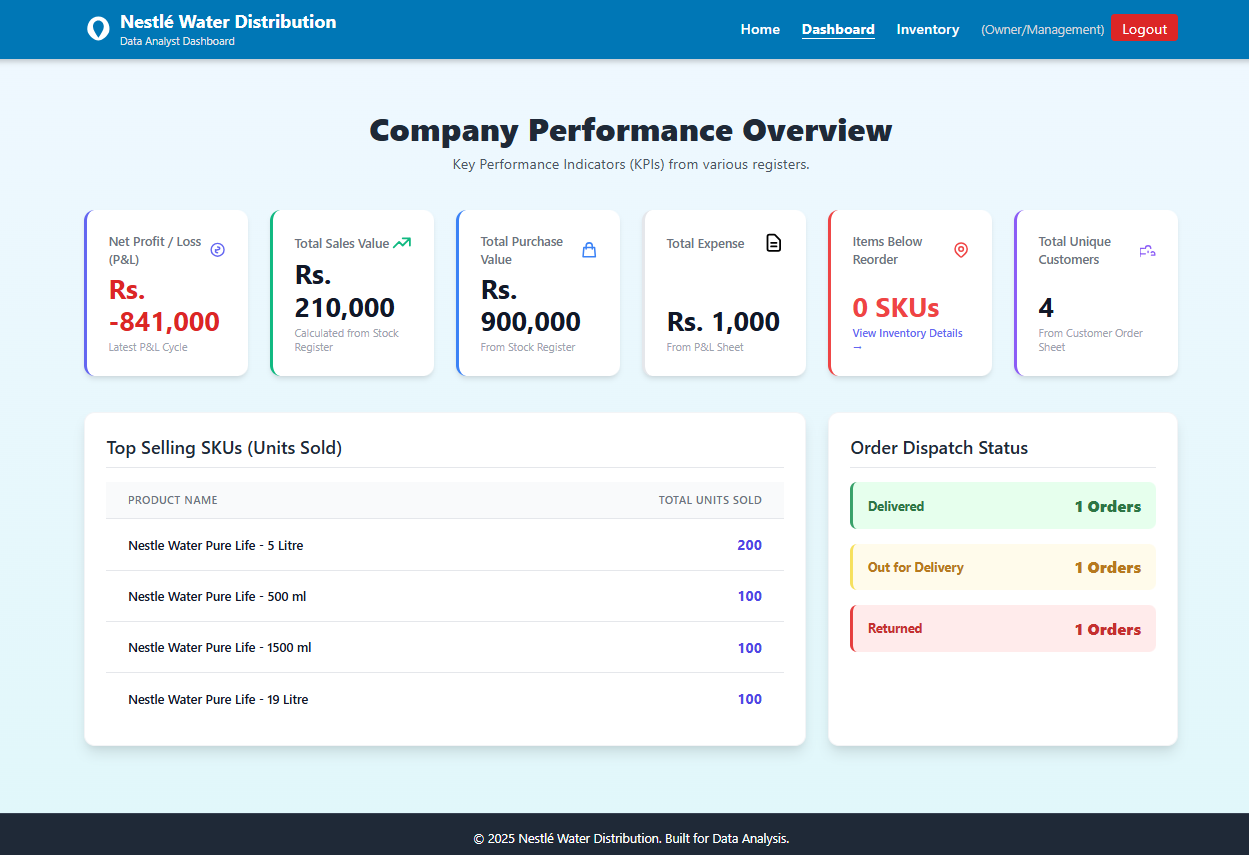
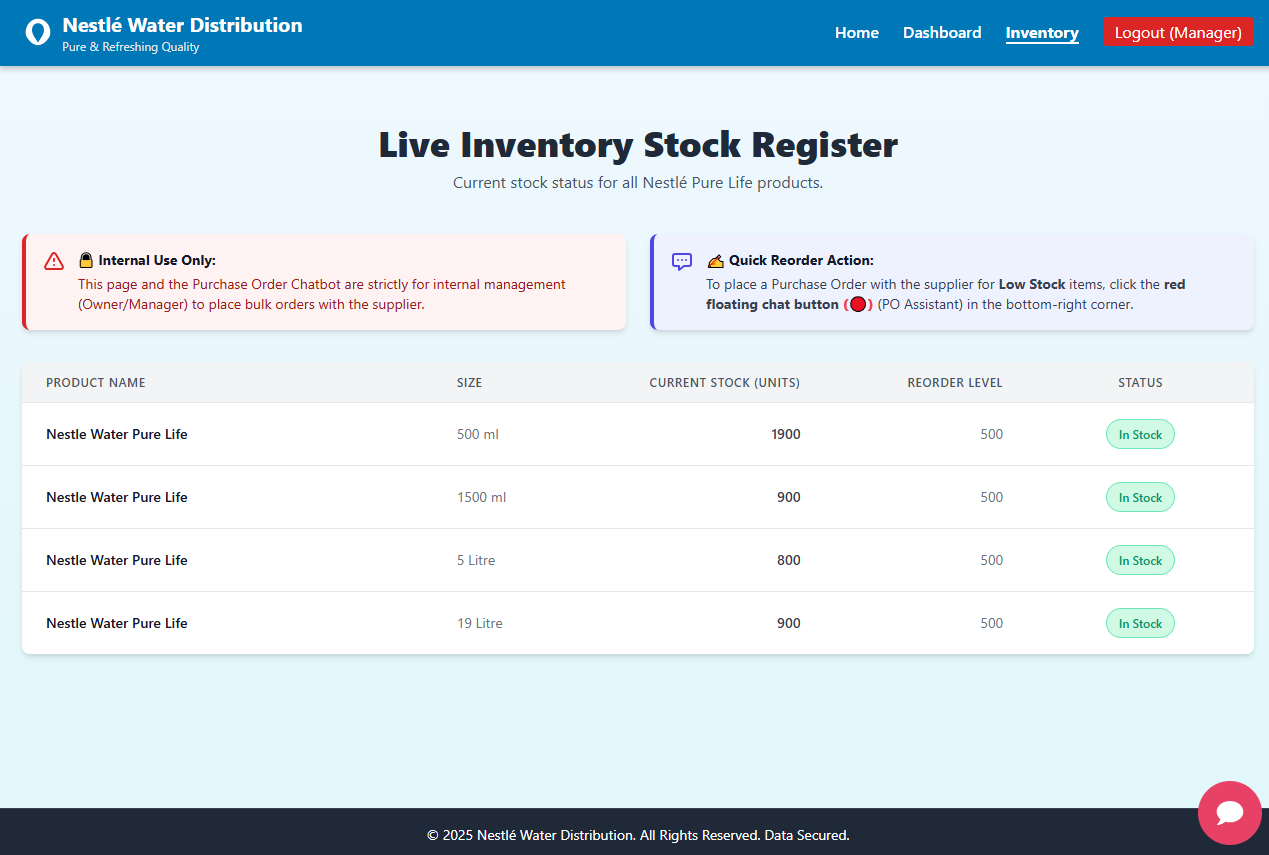
Upon administrative login, the Dashboard and Inventory tabs become visible, providing the “Command Center” for the business.
- 📊 Live Tracking & Dashboard: Real-time visibility into sales, profit/loss, and delivery status.
- 📦 Inventory & PO Chat: High-level tools for stock management and supplier communication.
🏭 Management & Analytics Portal (Admin View)
📊 Live Tracking & Dashboard
📦 Inventory & PO Chat
2.1. 🛒 Smart Customer Ordering & Invoicing (Steps 01 & 02)
💬 Step 01: Customer Order via Chat (Website/WhatsApp)
Overview & Benefits
- This step initiates the entire sales cycle, automating order taking when a customer interacts via the website’s chat function or other permissible channels.
- The process uses the Google Gemini Chat Model for intelligent order parsing.
- Benefit: Zero manual data entry, immediate stock verification by reading the Stock Register sheet, and faster order confirmation.
Workflow Details
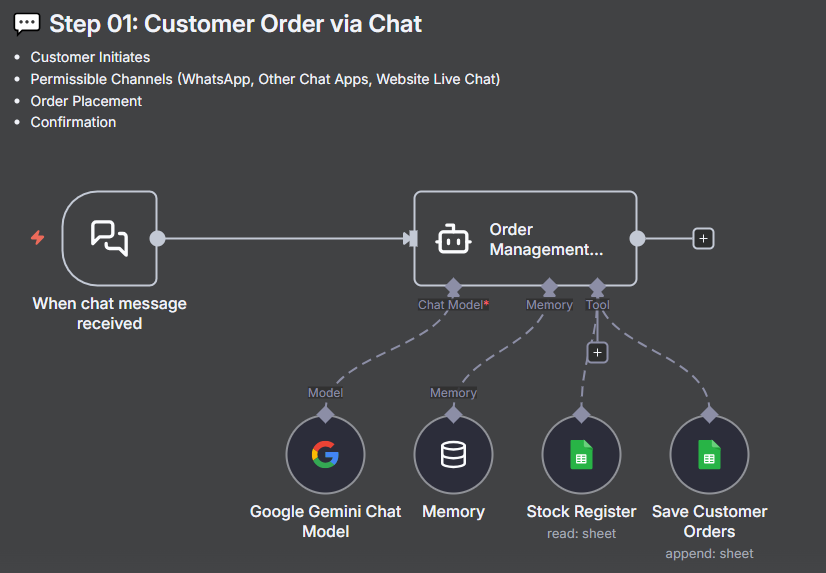
- Trigger: When a chat message is received from the customer.
- Logic/Process:
- The Order Management system uses the Google Gemini Chat Model for intelligent order parsing.
- The model verifies the order by reading the Stock Register sheet to check availability.
- The process includes Order Placement and Confirmation steps.
- Outcome/Result: The final order is placed, confirmed, and appended to the Save Customer Orders sheet.
Workflow Visualization
AI-Powered Order Processing This diagram illustrates the role of the Gemini Chat Model in interpreting customer messages, checking inventory, and reliably saving the structured data to the Google Sheet.
📧 Step 02: Invoice Process & Email to Customer
Overview & Benefits
- This process ensures that a formal invoice is automatically generated for every completed order.
- The system automates the delivery of the invoice, enhancing professionalism and trust with the customer.
- Benefit: Streamlines financial compliance and provides the customer with instant documentation for their records.
Workflow Details
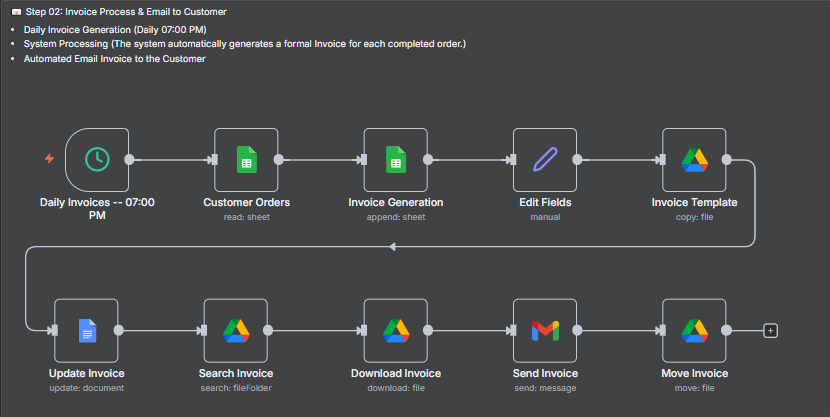
- Trigger: Daily Invoices – 07:00 PM Daily Trigger.
- Logic/Process:
- The system reads data from the Customer Orders sheet.
- The workflow performs Invoice Generation and appends the data to the Invoice sheet.
- The subsequent steps involve copying an Invoice Template, manually Editing Fields, Updating the document, Downloading the file, and finally Sending the Invoice via email.
- Outcome/Result: An automated email is sent to the customer containing the key order details and the professional invoice attached.
Invoice Generation Workflow
Daily Automated Invoice Process This diagram illustrates the complete workflow triggered daily at 07:00 PM, covering data read, generation, editing, downloading, and final email dispatch of the invoice.
Invoice & Email Preview
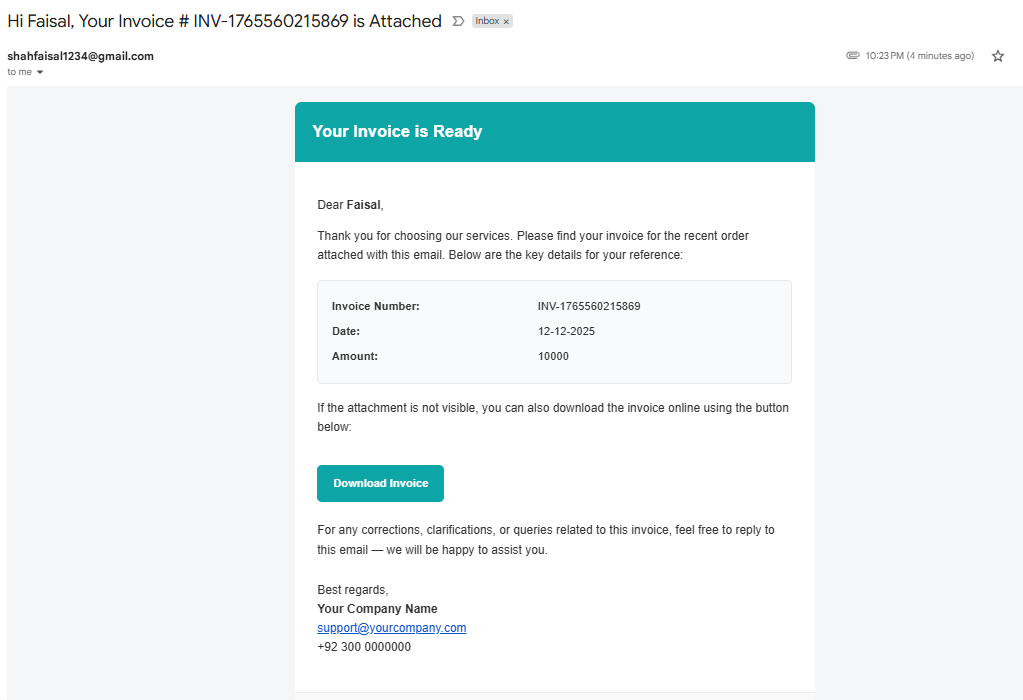
1. Email Notification with Invoice Attachment The customer receives a clear, automated email (e.g., subject: “Your Invoice # INV-1764686043117 is Attached”) with the professional invoice attached and key financial details (Amount: 10000) summarized.
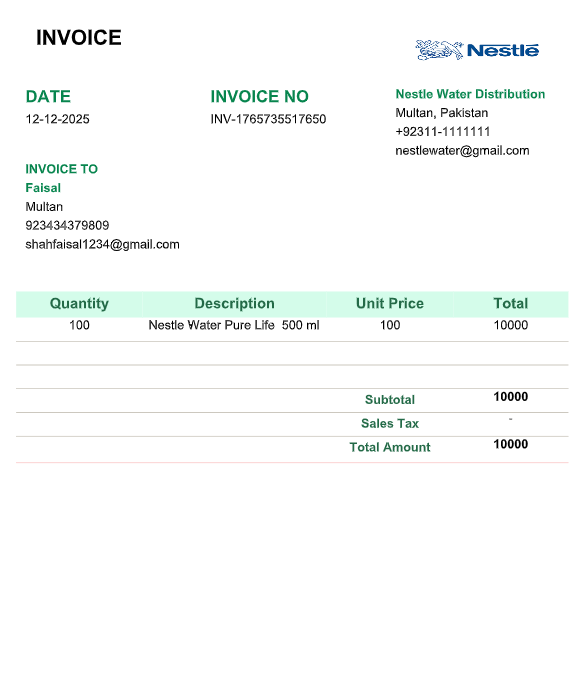
2. Generated Invoice Document The professional invoice for ‘Nestle Water Distribution Multan’ details the Quantity (100) and Description (‘Nestle Water Pure Life 500 ml’). The Total Amount is 10000.
2.2. 🏭 Automated Purchasing & Inventory Alerts (Steps 03-04)
🏭 Step 03: Purchase Order (PO) and Supplier Communication
Overview & Benefits
- This process handles the initiation of external purchases, communication with the supplier, and creation of a formal Purchase Order (PO) record.
- Benefit: Streamlines inventory acquisition, reduces manual communication effort, and instantly updates the Purchase Register.
Workflow Details
- Trigger: When a chat message is received, usually from an internal manager, initiating the Purchase Order (PO) request.
- Logic/Process:
- The system uses the Google Gemini Chat Model for ‘Purchase Order Management’ to parse PO details (Product ID, Quantity, Supplier Info).
- It appends the PO data to the Purchase Order sheet and retrieves Supplier Information.
- The system sends the formal purchase order as a message (email) to the supplier.
- Outcome/Result: A detailed Purchase Order email is automatically sent to the supplier, and records are updated.
Workflow Visualization & Email Preview
Purchase Order Management Workflow
PO Generation and Receiving Logic This diagram illustrates the logic where a chat message triggers Purchase Order Management, interacting with the Gemini Chat Model, and subsequently saving the data and sending the order via email to the supplier.
%20and%20Email%20to%20Supplier%20and%20Receieving%20Order.png)
Supplier Communication
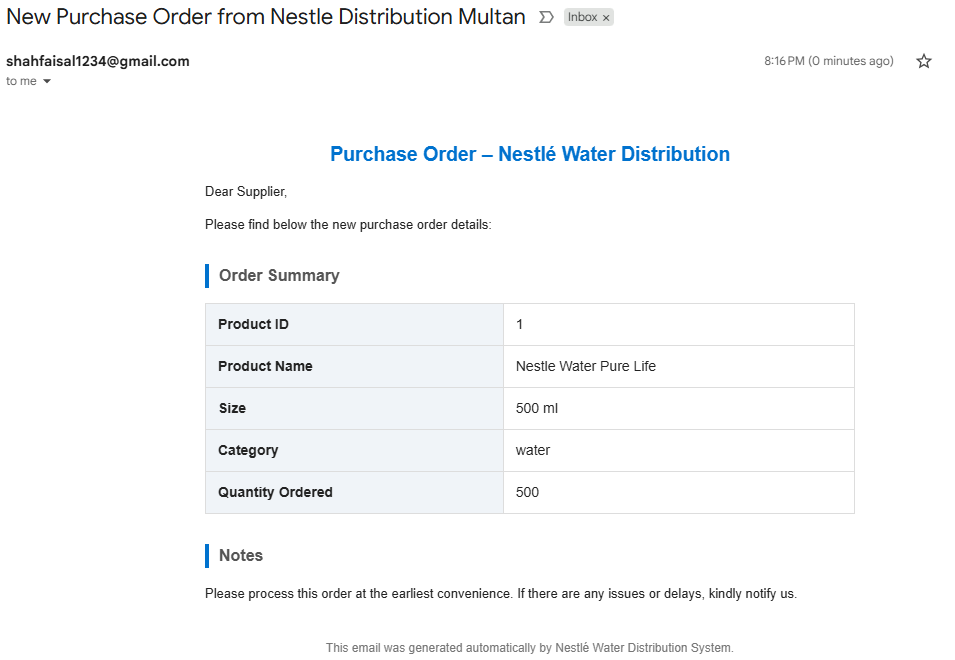
Purchase Order Email The supplier receives a professional email detailing the order summary, including Product Name (Nestle Water Pure Life), Quantity Ordered (500), Size (500 ml), and Category (water).
⚠️ Step 04: Expiry Stock Alert System
Overview & Benefits
- This system proactively monitors inventory health to alert management when stock is nearing its expiry date.
- Benefit: Proactive risk mitigation, allowing teams (Sales/Disposal) to take immediate action to minimize loss before stock becomes unusable.
Workflow Details
- Trigger: Stock Received row update (in the Receive Stock Register).
- Logic/Process:
- Source data checks the expiry dates mentioned in the Receive Stock Register.
- The alert Threshold is triggered when an item’s expiry date is 30 days or less away.
- Custom JavaScript code and an If node determine if the alert condition is met before sending the email.
- Outcome/Result: An URGENT Email Notification is sent to the Company Owner, detailing the product and days remaining.
Workflow Visualization & Email Preview
Expiry Alert Logic Workflow
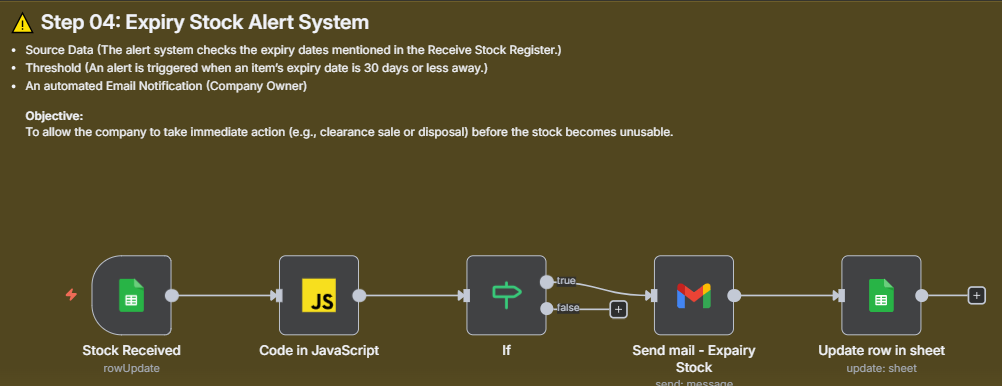
Monitoring Inventory Health This workflow shows the logic path: a Stock Received update triggers code execution, which determines (If node) whether the expiry threshold is met before sending the urgent alert email and updating the row in the sheet.
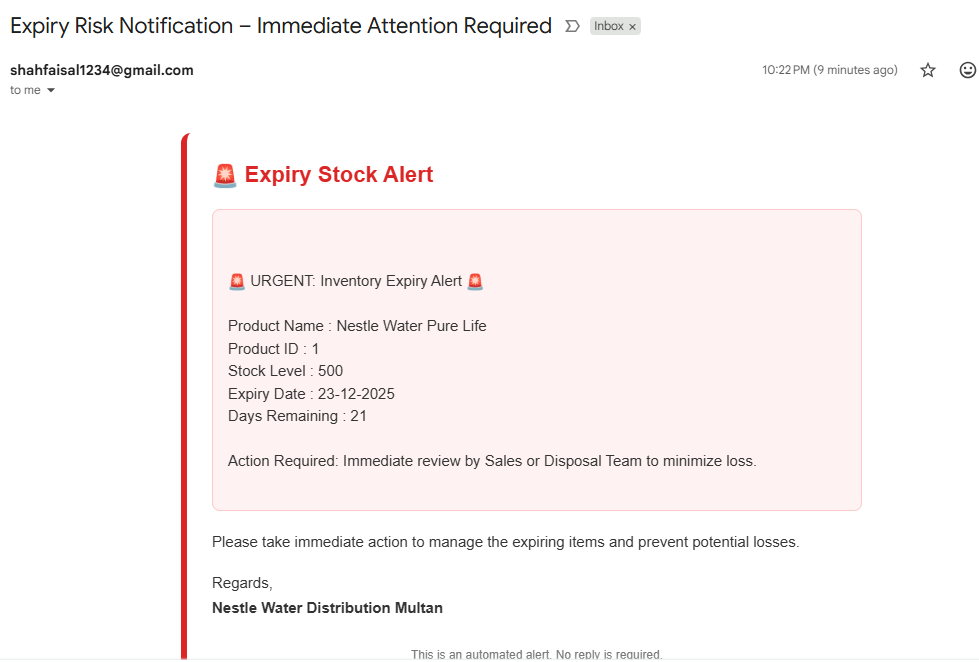
Owner Alert Notification
Expiry Risk Notification - Immediate Attention Required The urgent email highlights critical data points: Product Name (Nestle Water Pure Life), Stock Level (500), Expiry Date (23-12-2025), and Days Remaining (21). The email states that Action is Required: Immediate review by Sales or Disposal Team to minimize loss.
2.3. 🚚 Daily Dispatch & Delivery Tracking (Steps 05-07)
🚚 Step 05: Daily Dispatch and Customer Notification
Overview & Benefits
- This step initiates the logistics process by processing all orders received from the previous day using a Daily 07 AM Trigger.
- The status is immediately updated to “Dispatched” in the main Customer Orders Sheet.
- Benefit: Ensures timely dispatch, streamlines logistics coordination, and provides real-time updates to the customer and the logistics team.
Workflow Details
- Trigger: Daily Trigger (07:00 AM).
- Logic/Process:
- The workflow reads the Customer Orders sheet.
- It processes Delivery Person Details (Salesperson’s Name and Contact) using a JavaScript node.
- It appends the dispatch details (including Salesperson info) to the Dispatch Orders sheet.
- It then updates the status in the main Customer Orders sheet to “Dispatched”.
- Outcome/Result: Both a Customer Email Notification and a Logistic Team Email Notification are sent.
Workflow Visualization & Email Preview
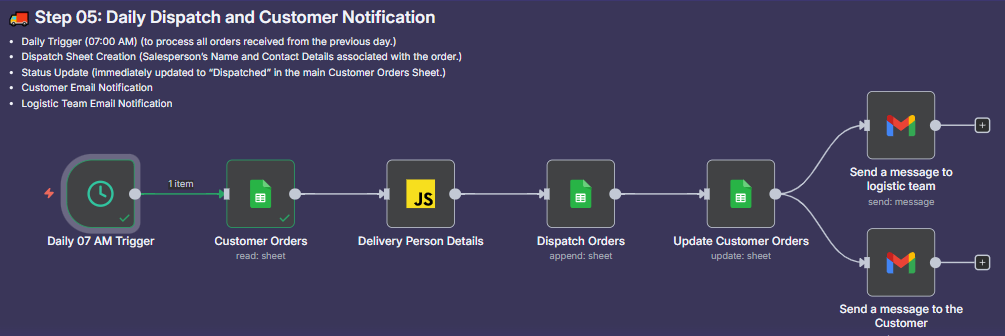
Daily Dispatch Workflow
Automated Dispatch Coordination This workflow shows the 07 AM trigger reading customer data, processing delivery person details, updating both Dispatch and Customer Orders sheets, and simultaneously sending emails to the logistics team and the customer.
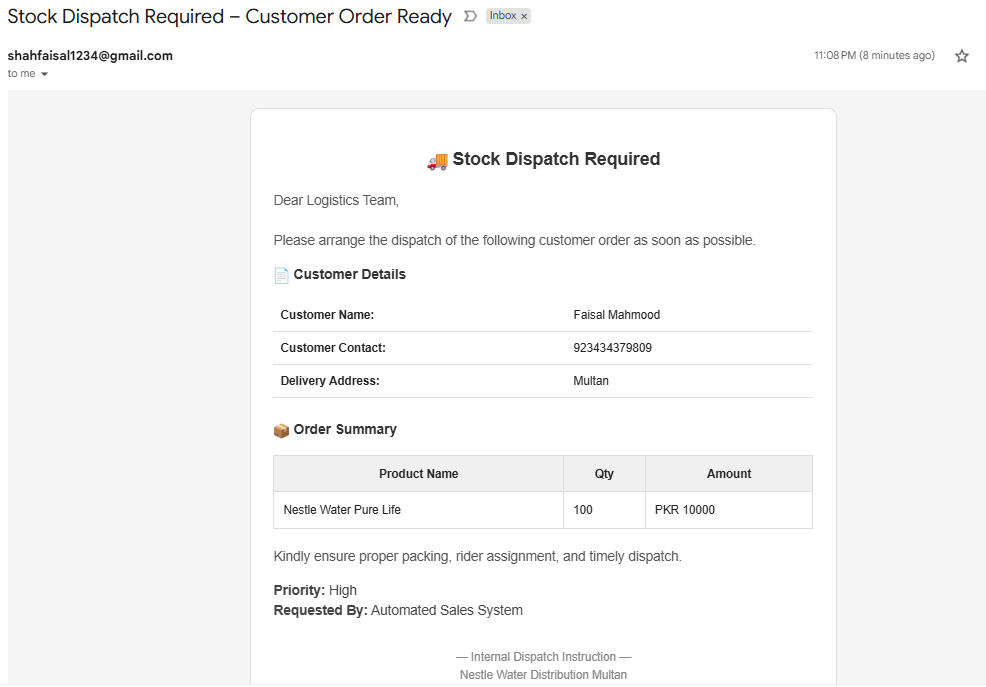
Logistics Team Instruction
Stock Dispatch Required - Customer Order Ready The logistics team receives an internal instruction detailing the order summary, including Customer Name (Faisal Mahmood), Delivery Address (Multan), and Product Quantity (100).
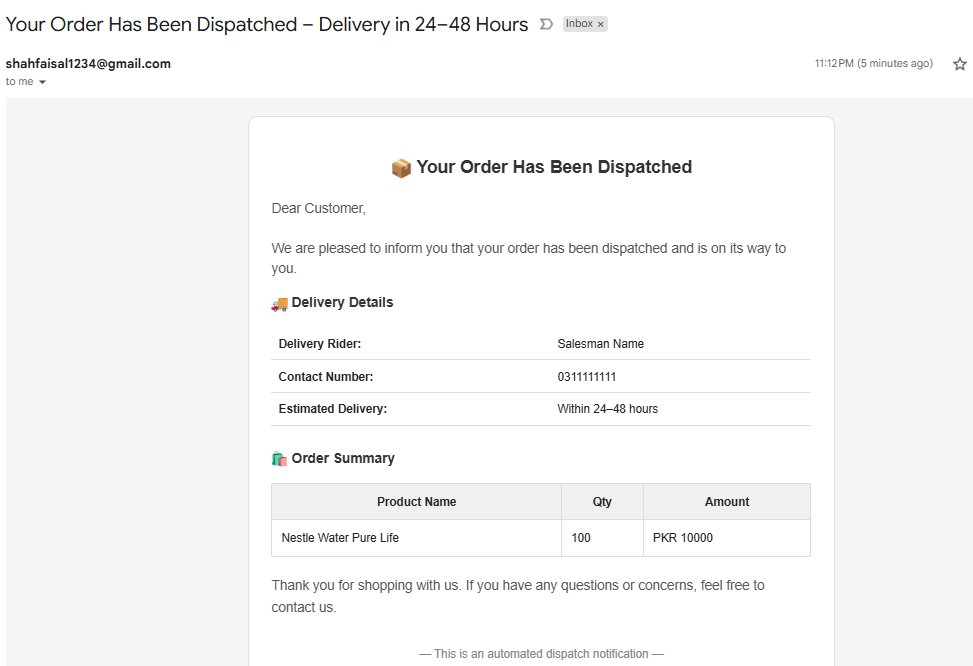
Customer Dispatch Notification
Your Order Has Been Dispatched – Delivery in 24-48 Hours The customer receives confirmation of dispatch along with Delivery Details (Delivery Rider, Contact Number) and Estimated Delivery (Within 24-48 hours).
🚨 Step 06: Delivery Status Monitoring and Alert
Overview & Benefits
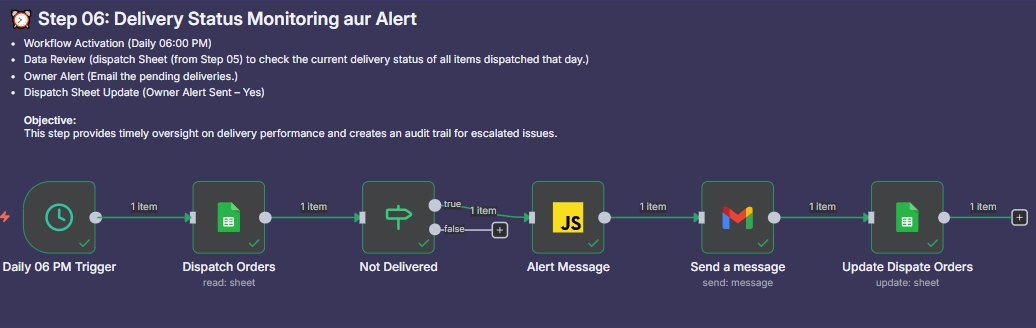
- This step provides automated oversight on delivery performance by checking the current delivery status of all items dispatched that day.
- Objective: Creates an audit trail for escalated issues and ensures management is promptly alerted about pending deliveries.
Workflow Details
- Trigger: Daily 06 PM Trigger.
- Logic/Process:
- The workflow reads the Dispatch Orders sheet.
- It uses a condition (Not Delivered node) to filter for items where the delivery status is not “Delivered”.
- If pending, the system generates an Alert Message (using JavaScript).
- It sends an Owner Alert email detailing the pending deliveries.
- It updates the Dispatch Sheet with “Owner Alert Sent = Yes”.
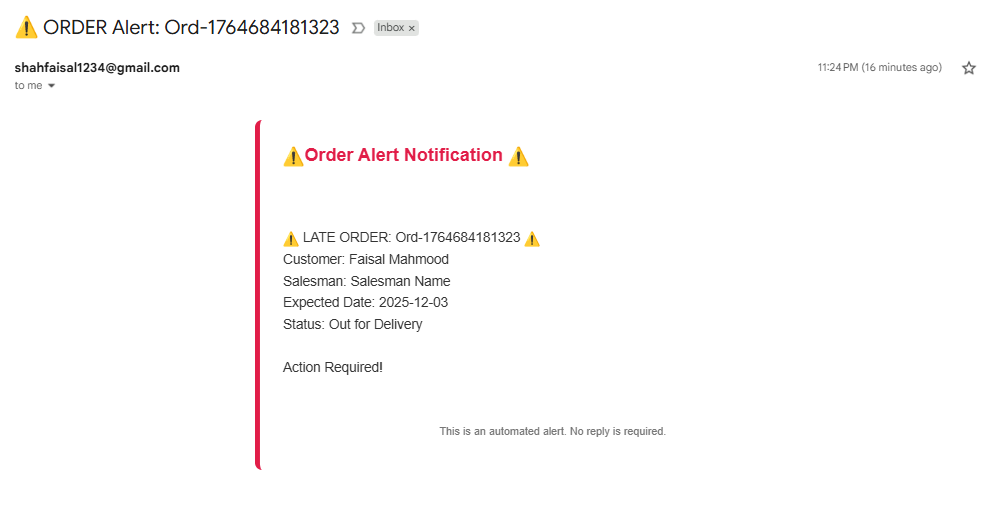
- Outcome/Result: The Company Owner receives an URGENT Order Alert Notification detailing the late order and requesting action.
Workflow Visualization & Email Preview
Monitoring Workflow
Late Delivery Alert System This diagram shows the 06 PM trigger reading the Dispatch Orders, filtering for ‘Not Delivered’, generating the alert message via JavaScript, sending the alert email, and updating the dispatch sheet.
Management Alert Notification
ORDER Alert: Late Delivery The alert notification details the LATE ORDER ID, Customer Name, Salesman, Expected Date, and Status (“Out for Delivery”), explicitly stating Action Required!.
🤝 Step 07: Delivery Confirmation and Final Customer Notification
Overview & Benefits
- This step finalizes the order cycle by integrating data submission from the delivery personnel.
- Benefit: Ensures that both the Dispatch and Customer Orders sheets are updated with the final status and payment method, and provides the customer with a definitive “Delivered” confirmation.
Workflow Details
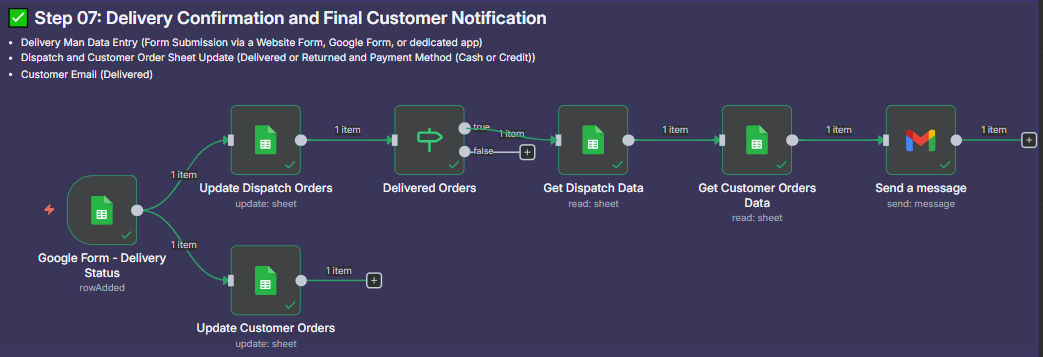
- Trigger: Delivery Man Data Entry via Google Form submission.
- Logic/Process:
- The form submission simultaneously updates the Dispatch Orders sheet and the Customer Orders sheet with the final status (Delivered or Returned) and Payment Method (Cash or Credit).
- The workflow checks the status using the Delivered Orders node.
- If true (Delivered), it retrieves Dispatch Data and Customer Order Data to prepare the confirmation email.
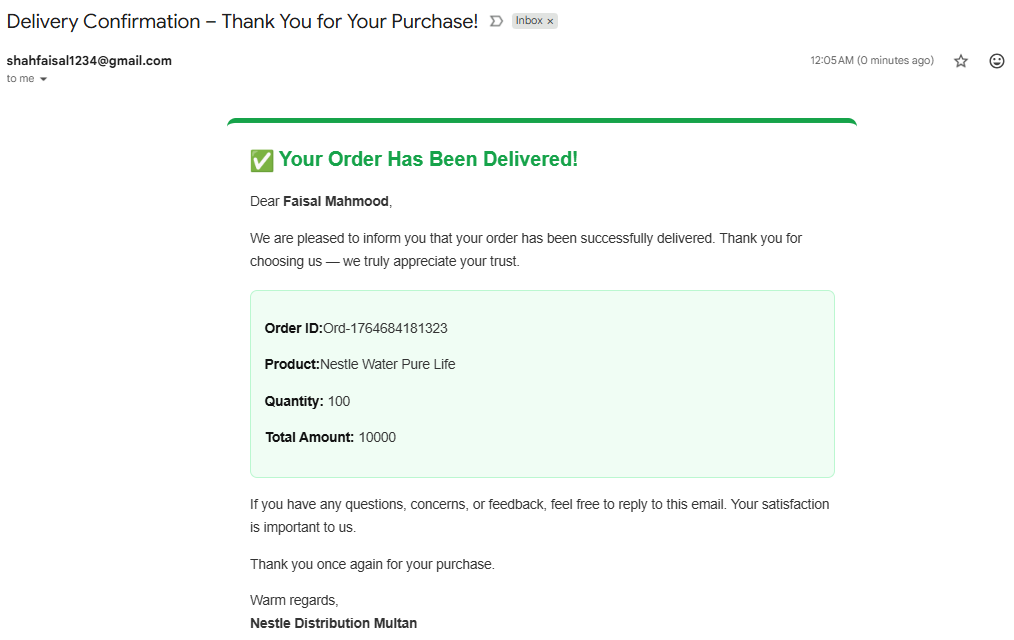
- Outcome/Result: If the order is marked “Delivered,” a Final Customer Email is sent to thank the customer and confirm the successful delivery.
Workflow Visualization & Email Preview
Confirmation Workflow
Delivery Status Finalization This diagram shows the dual update path triggered by the form submission, which is followed by the logic check (Delivered Orders) and the final customer notification via email if the order was delivered.
Final Customer Email
Delivery Confirmation – Thank You for Your Purchase! This email confirms that the order has been successfully delivered and details the Order ID, Product, Quantity, and Total Amount, serving as the final closeout of the order.
2.4. 💡 Inventory & Financial Intelligence (Steps 08-13)
📊 Step 08: Sales Analysis and Stock Register Enrichment
Overview & Benefits
- This step continuously analyzes confirmed sales data to enrich the main Stock Register.
- Benefit: Provides the inventory team with actionable context directly in the stock management interface, aiding in demand forecasting and proactive stock alerts.
Workflow Details
- Trigger: Daily 09:00 AM Trigger.
- Logic/Process:
- It filters all customer orders confirmed as “Delivered” (as per Step 07).
- Data is calculated for Last 30 Days Sale (Product Wise) and Days Since Last Sale.
- The workflow updates the Stock Register sheet with these calculated metrics.
- Outcome/Result: Stock Register contains real-time sales velocity data, ready for ROL checks and slow-moving stock identification.
Workflow Visualization
Inventory Data Enrichment This diagram illustrates the complex data processing, where delivered orders are read, filtered by date, aggregated, and then used to update the Stock Register with calculated sales metrics (Last 30 Days Sale and Days Since Last Sale).
%20Register%20Enrichment.png)
💰 Step 09: Automated Reorder and Purchase Order Generation
Overview & Benefits
- This is a critical proactive inventory control step, preventing stock-out situations by automatically generating Purchase Orders (PO) when stock levels are critically low.
- Benefit: Minimizes revenue loss due to out-of-stock items and ensures inventory replenishment is timely.
Workflow Details
- Trigger: Daily 10:00 AM Trigger.
- Logic/Process:
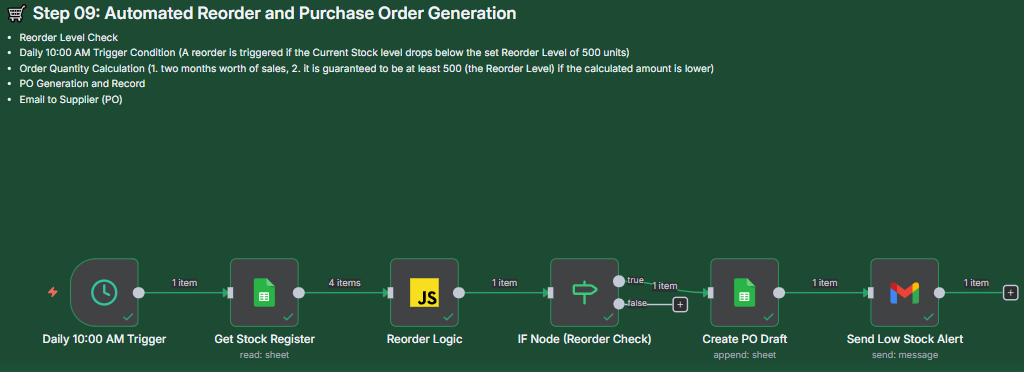
- Reorder Level Check: A reorder is triggered if the Current Stock level drops below the set Reorder Level of 500 units.
- Order Quantity Calculation: The required quantity is calculated based on two months’ worth of sales, guaranteed to be at least 500 units (the Reorder Level).
- An If Node (Reorder Check) determines if the condition is met.
- Outcome/Result: If triggered, a PO draft is created, and a Low Stock Alert Email is sent to the purchasing manager for immediate action.
Workflow Visualization & Email Preview
Automated Reorder Logic
Reorder Point (ROP) System This workflow shows the daily check, ROL calculation via JavaScript, the If Node check, and the subsequent path to either drafting the PO or sending the alert.
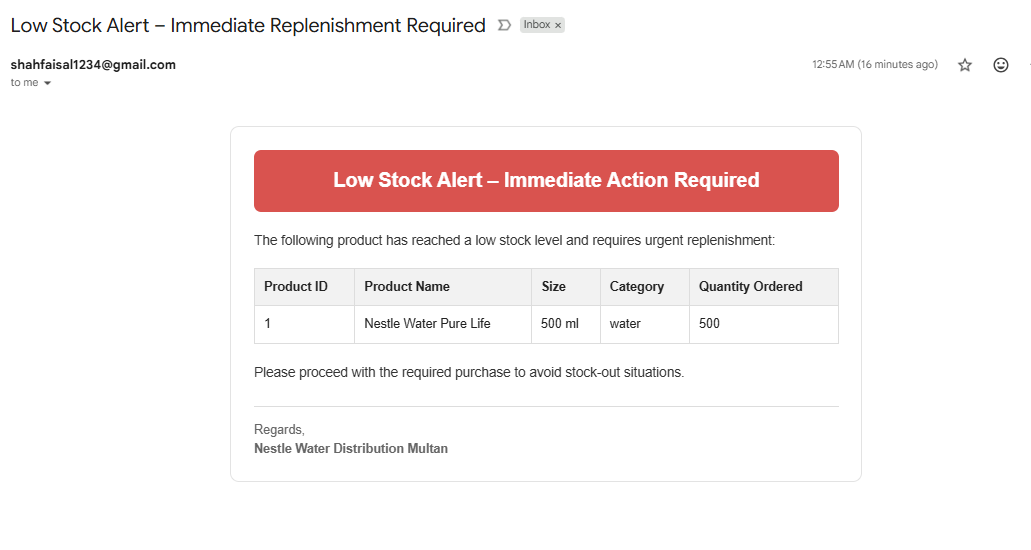
Replenishment Alert
Low Stock Alert – Immediate Action Required The email explicitly states the Product Name, Quantity Ordered (e.g., 500), and the requirement for urgent replenishment to avoid stock-out situations.
📉 Step 10: Dead Stock and Slow-Moving Inventory Alert
Overview & Benefits
- This crucial financial health step identifies inventory that is not moving, tying up capital, and risking expiry.
- Objective: To prompt the owner to take necessary action (like running a promotion or initiating disposal) to minimize holding costs and prevent financial loss.
Workflow Details
- Trigger: Monthly 1st Date 09:00 AM Trigger (or on the 1st day of every week).
- Logic/Process:
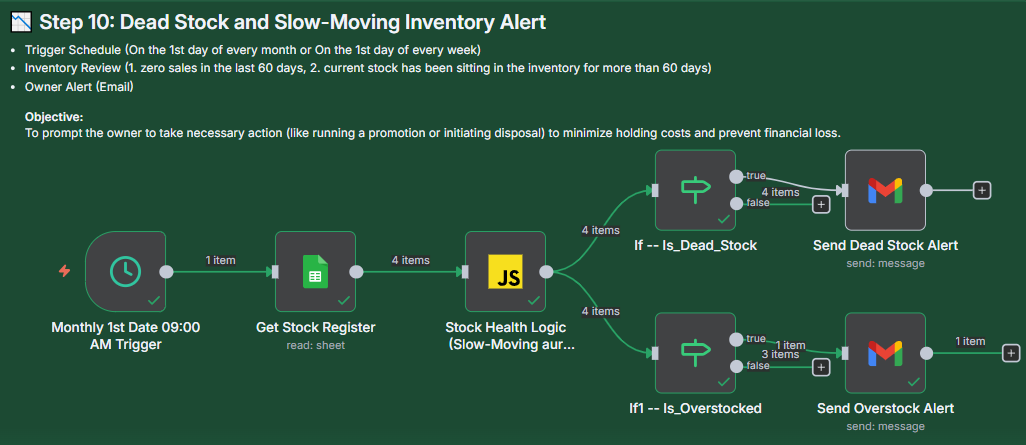
- Dead Stock Review: Checks for items with zero sales in the last 60 days AND where current stock has been sitting in the inventory for more than 60 days.
- Slow-Moving/Overstock Review: Also checks for items with high inventory levels (Overstock).
- Outcome/Result: The Owner receives a Dead Stock Alert or an Overstock Alert email, detailing the financial value and required action.
Workflow Visualization & Email Preview
Stock Health Monitoring Workflow
Dead Stock & Overstock Detection This workflow shows the scheduled monthly check reading the Stock Register, applying Stock Health Logic via JavaScript, and routing to two separate alert paths based on the If Node checks.
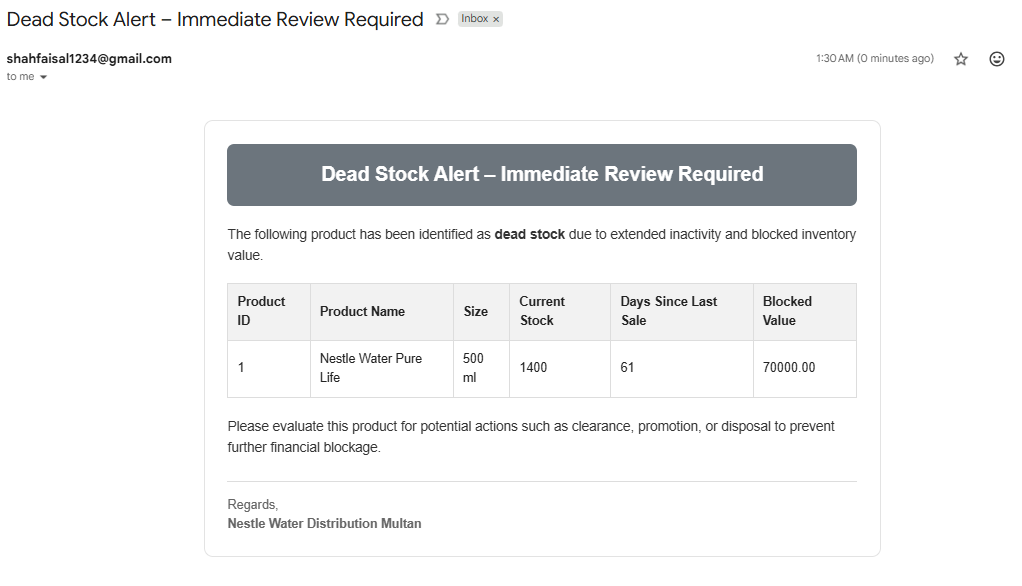
Alert Previews
1. Dead Stock Alert – Immediate Review Required Highlights Product Name, Current Stock (e.g., 1400), Days Since Last Sale (61), and the Blocked Value (e.g., 70000.00) to prompt evaluation for clearance or disposal.
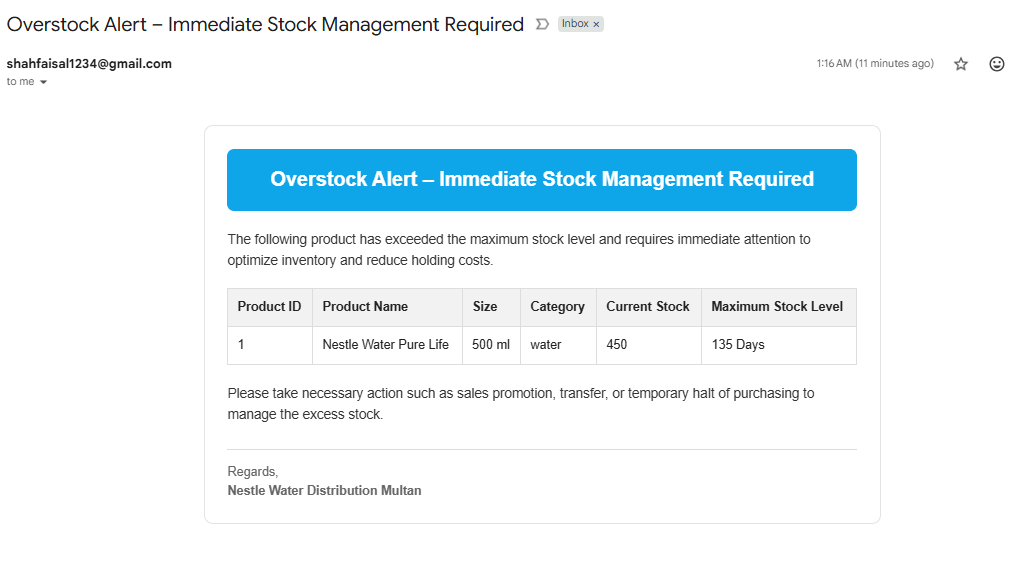
2. Overstock Alert – Immediate Stock Management Required Highlights Current Stock (e.g., 450) vs. Maximum Stock Level (135 Days) to optimize inventory and reduce holding costs.
💳 Step 11: Payment Register Reconciliation and Due Date Setting
Overview & Benefits
- This step finalizes the financial records for every delivered order, establishing a clear record of receivables (pending payments).
- Objective: Creates formal tracking for credit customers and synchronizes the Customer Orders status with the final payment method.
Workflow Details
- Trigger: Daily 11:00 PM Trigger.
- Logic/Process:
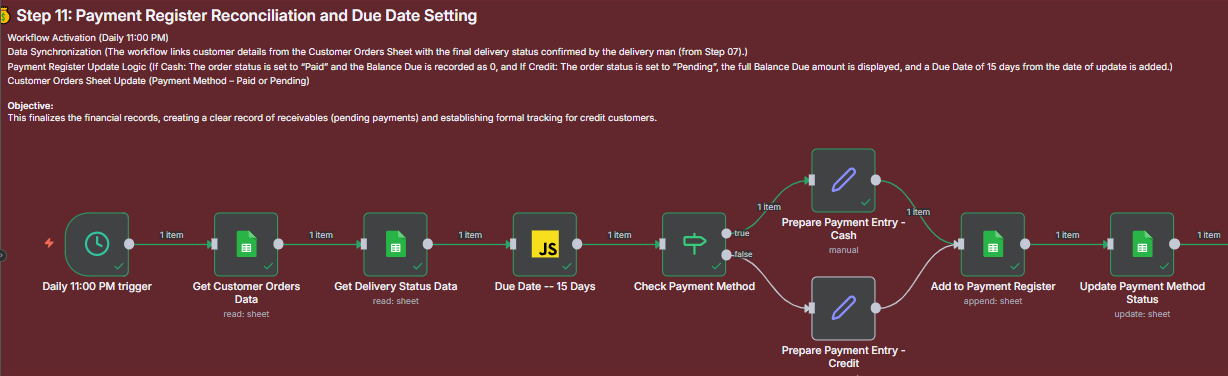
- Data Synchronization: Links customer and delivery status data (from Step 07).
- Payment Register Logic:
- If order status is “Paid” (Cash), the Balance Due is recorded as 0.
- If order status is “Pending” (Credit), the full Balance Due is displayed, and a Due Date of 15 days from the update is added.
- The system updates the Customer Orders Sheet status to ‘Paid’ or ‘Pending’.
- Outcome/Result: The Payment Register is updated with accurate balance amounts and formal 15-day Due Dates for credit customers.
Workflow Visualization
Financial Closure Workflow This workflow shows the 11 PM trigger getting customer and delivery data, calculating the 15-day due date via JavaScript, checking the payment method, and routing to prepare and append the entry to the Payment Register before updating the customer sheet.
🔔 Step 12: Overdue Payment Alert and Follow-up
Overview & Benefits
- This process is critical for cash flow management, automatically identifying and flagging customers whose credit period has expired.
- Objective: To automate the collection process by simultaneously reminding the customer and escalating the issue internally to the Sales Team for priority follow-up.
Workflow Details
- Trigger: Daily 01:00 PM Trigger (Daily Check).
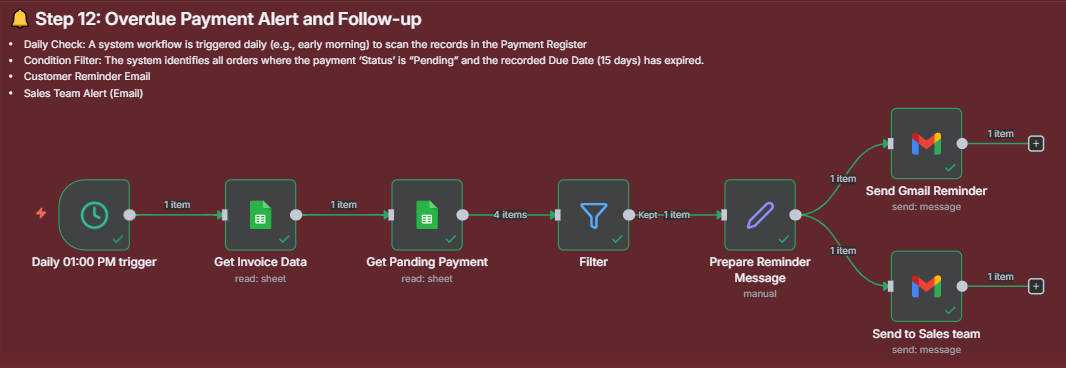
- Condition Filter: The system scans the Payment Register for orders where the Status is “Pending” AND the recorded Due Date (15 days) has expired.
- Logic/Process:
- Filters the pending invoices.
- Prepares separate Reminder Messages (emails).
- Outcome/Result:
- Customer Reminder Email is sent.
- Sales Team Alert Email is sent for immediate follow-up.
Workflow Visualization & Email Preview
Overdue Payment Logic
Automated Collections System This diagram shows the daily check, reading the invoice and payment data, filtering for overdue items, preparing reminder messages, and sending dual emails to both the customer and the sales team.
Alert Previews
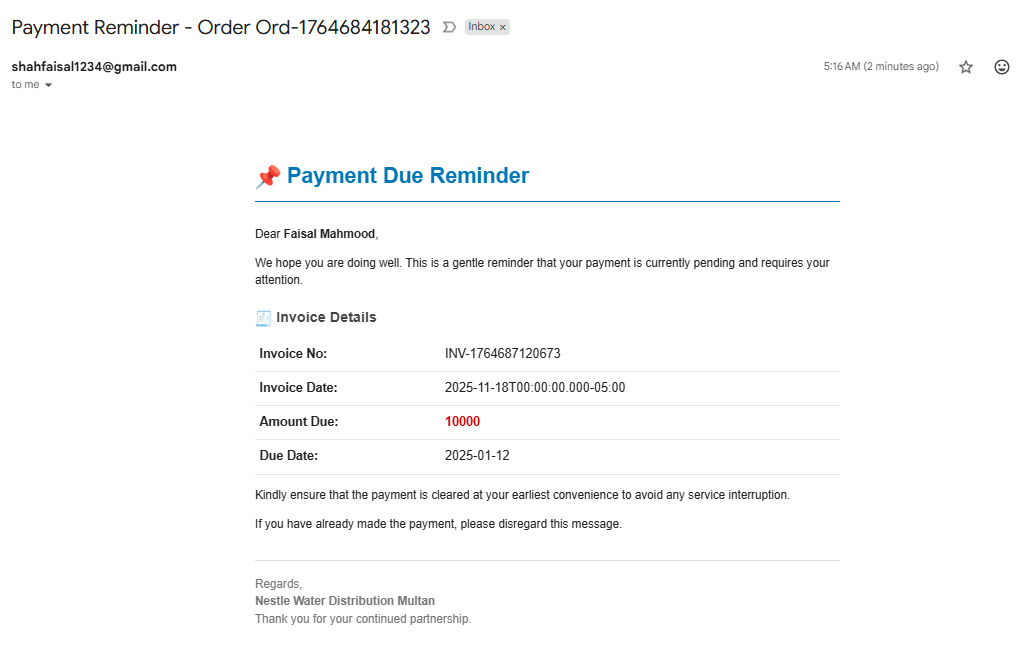
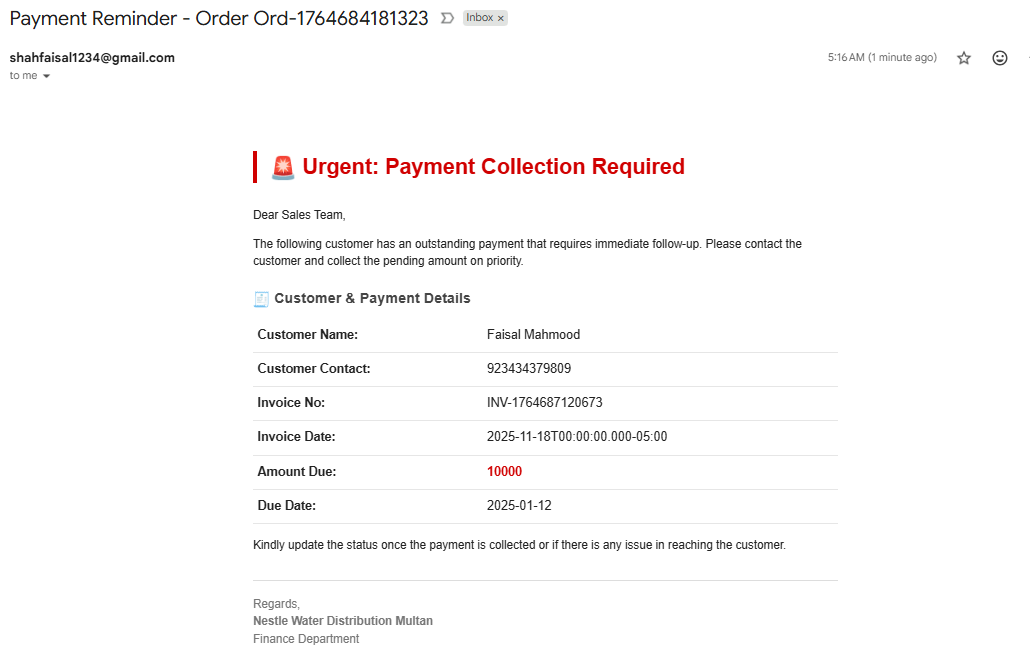
1. Payment Due Reminder (Customer) A gentle reminder detailing the Invoice No, Invoice Date, Amount Due (e.g., 10000), and the Due Date (e.g., 2025-01-12).
2. Urgent: Payment Collection Required (Sales Team) An urgent alert for the Sales Team containing Customer & Payment Details (Name, Contact, Amount Due, Due Date) to ensure priority collection follow-up.
📈 Step 13: Monthly Financial Reporting (P&L and Stock Valuation)
Overview & Benefits
- This is the comprehensive financial closing step, which automatically compiles all sales, expense, and inventory data from the preceding month.
- Benefit: Provides the Owner and Finance Team with a critical Monthly Profit & Loss (P&L) Statement and Current Stock Valuation without manual compilation, enabling accurate financial evaluation and planning.
Workflow Details
- Trigger: Monthly 1st Date 11:00 AM Trigger.
- Logic/Process:
- Time Period Calculation: Calculates the date range for the Last Month’s Sales, Expenses, and Purchases.
- Data Aggregation: Separately retrieves and aggregates Revenue (Sales Data), COGS (Purchase Data), Expenses (Expense Data), and Current Stock for valuation.
- P&L Calculation: Merges the aggregated financial data to calculate Gross Profit, Total Operating Expenses, and Net Profit/Loss.
- Outcome/Result: A detailed P&L and Stock Valuation email is sent to the Owner, and the P&L data is appended to the P&L Sheet.
Workflow Visualization & Email Preview
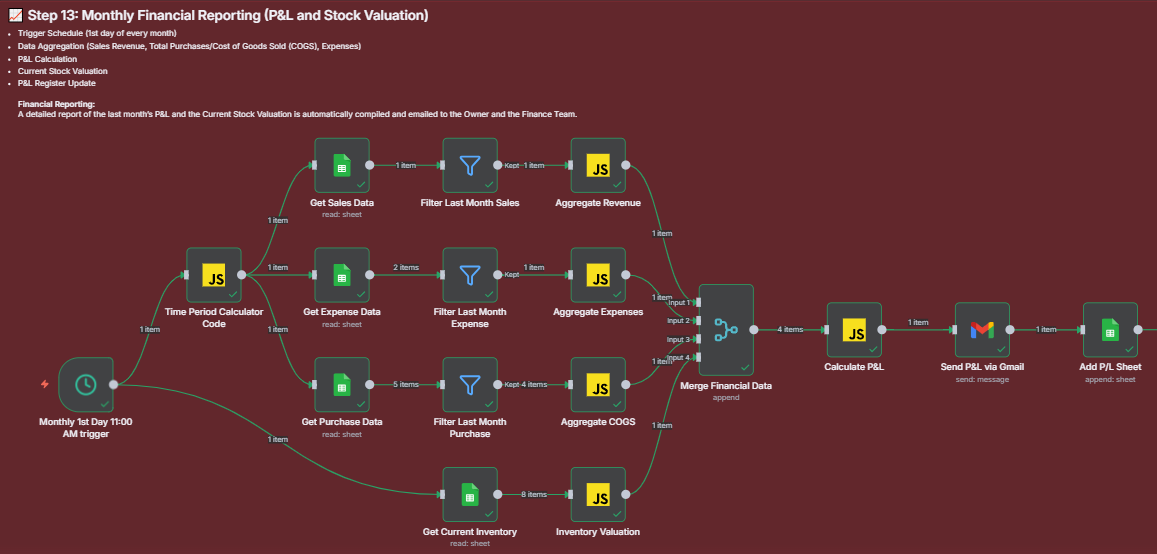
Monthly Financial Reporting Workflow
Automated Financial Closing System This detailed workflow shows the monthly trigger, concurrent data retrieval for Sales, Expenses, Purchases, and Inventory, multiple JavaScript nodes for aggregation and calculation, and the final merge and email output.
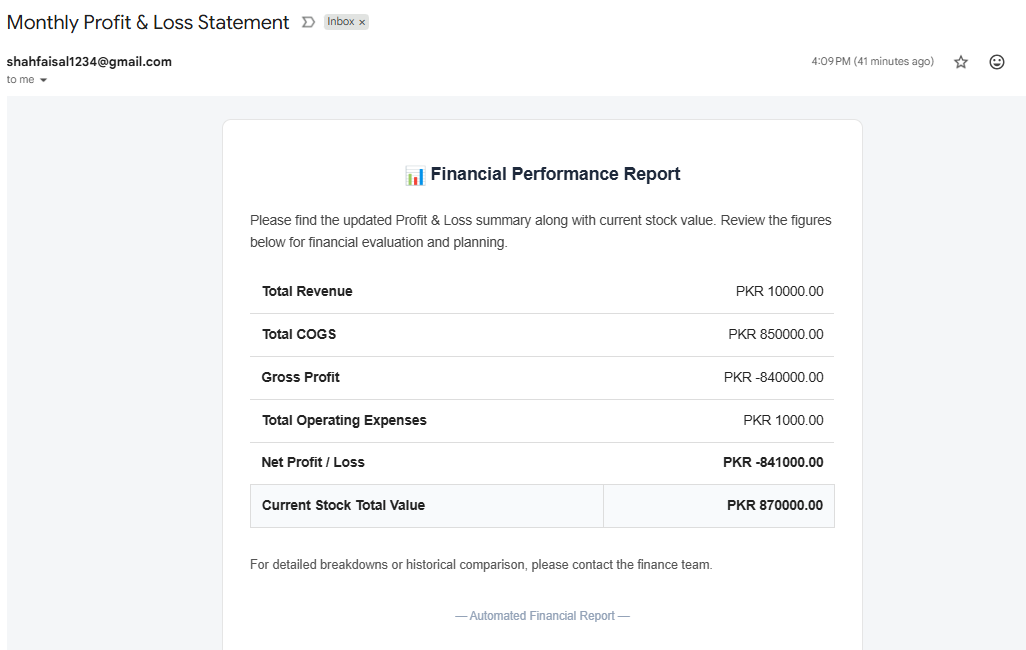
Financial Performance Report
Monthly Profit & Loss Statement The report provides a clear summary of the month’s performance, including Total Revenue (PKR 10000.00), Total COGS (PKR 850000.00), Net Profit/Loss (PKR -841000.00), and the Current Stock Total Value (PKR 870000.00).
2.5. 💖 Personalized CRM & Marketing (Steps 14-17)
📢 Step 14: New Product Launch Communication
Overview & Benefits
- This step ensures that the existing customer base is immediately informed when a new product is launched, leveraging past purchase data for quick sales.
- Benefit: Maximizes initial sales, ensures marketing efforts are tracked, and keeps the customer base engaged with the brand.
Workflow Details
- Trigger: New Product Data row is added to the product catalog sheet.
- Logic/Process:
- Customer Data Retrieval: Retrieves the contact details (name and email address) of all existing customers from the Customer Orders Sheet.
- Email Campaign Preparation: Uses JavaScript to prepare the tailored announcement message.
- Outcome/Result: A Customer Email Campaign is dispatched, and the campaign data is logged in the system.
Workflow Visualization & Email Preview
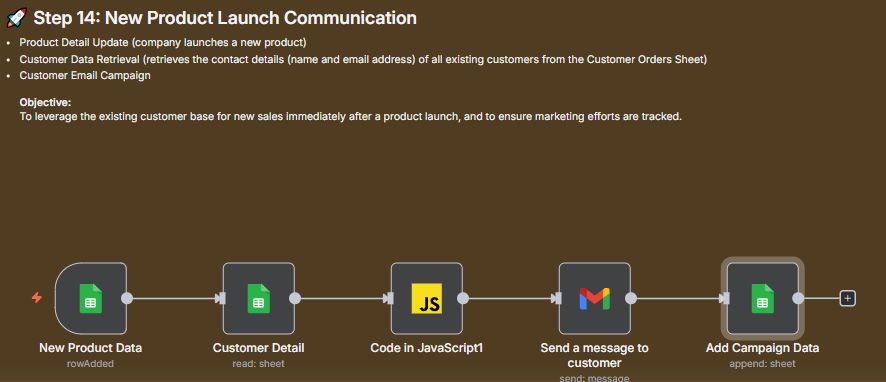
Product Launch Communication Workflow
Targeted Announcement System This workflow shows the product data trigger, customer detail retrieval, JavaScript code for message preparation, and the final dispatch of the email campaign to the customer base.
Launch Announcement
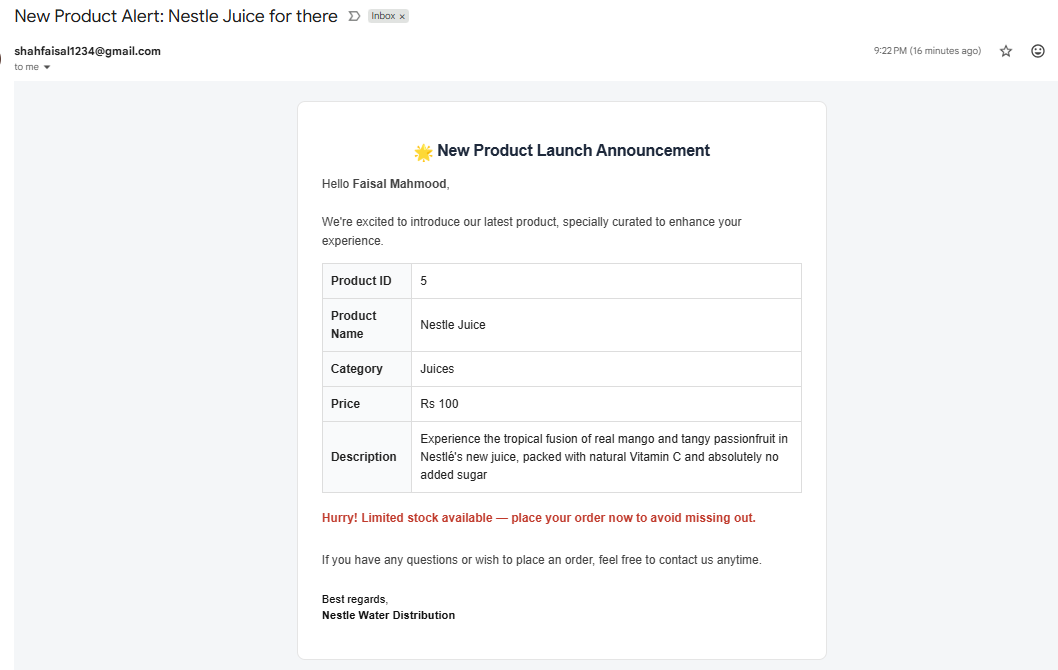
New Product Alert: Nestle Juice for there The email announces the Product Name (Nestle Juice), Category (Juices), Price (Rs 100), and a description, urging the customer to place an order immediately.
🏷️ Step 15: Proactive Clearance Discount Campaign
Overview & Benefits
- This step addresses slow-moving or overstocked items by proactively running a targeted discount campaign to specific customers.
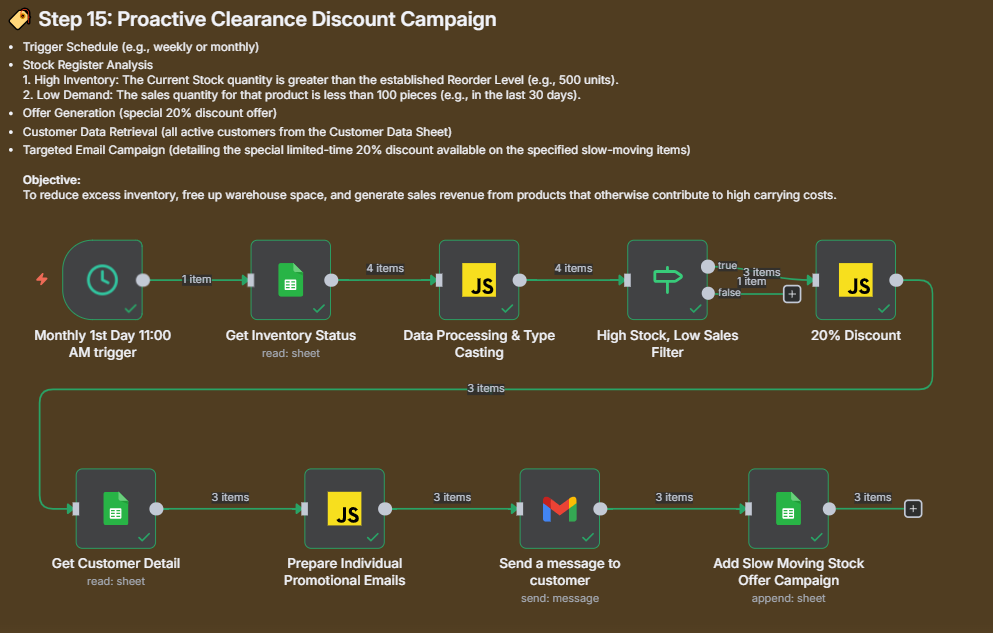
- Objective: To reduce excess inventory, free up warehouse space, and generate sales revenue from products that would otherwise contribute to high carrying costs.
Workflow Details
- Trigger: Monthly 1st Day 11:00 AM Trigger.
- Filter Logic:
- High Inventory: Current stock quantity is greater than the set Reorder Level (e.g., 500 units).
- Low Demand: Sales quantity for that product is less than 100 pieces (in the last 30 days).
- Offer Generation: A special limited-time 20% discount offer is applied to the slow-moving items.
- Outcome/Result: A Targeted Email Campaign is sent to active customers detailing the special offer, and the campaign is logged.
Workflow Visualization & Email Preview
Clearance Campaign Workflow
Slow-Moving Stock Reduction Logic This complex workflow reads inventory status, processes data, applies the High Stock/Low Sales filter, calculates the 20% discount via JavaScript, retrieves customer details, and sends individual promotional emails.
Special Offer Email
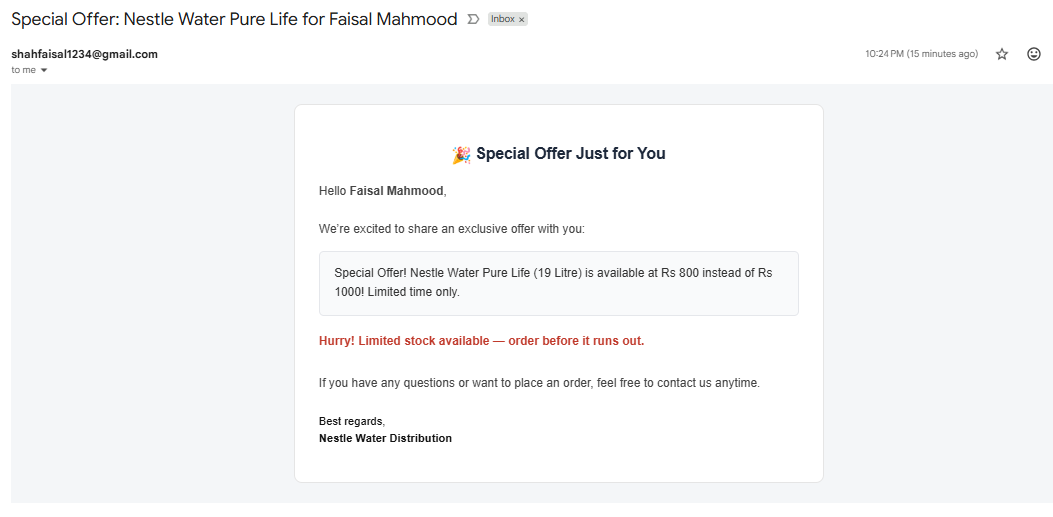
Special Offer: Nestle Water Pure Life for Faisal Mahmood The personalized email shares an exclusive offer (e.g., Nestle Water Pure Life (19 Litre) is available at Rs 800 instead of Rs 1000) with an urgency message (Limited stock available).
🎯 Step 16: Personalized Customer Retention Campaign
Overview & Benefits
- This process drives sales and improves customer loyalty by recognizing purchase history and behavioral data.
- Objective: To re-engage customers who have been inactive and reward high-value customers with personalized discounts.
Workflow Details
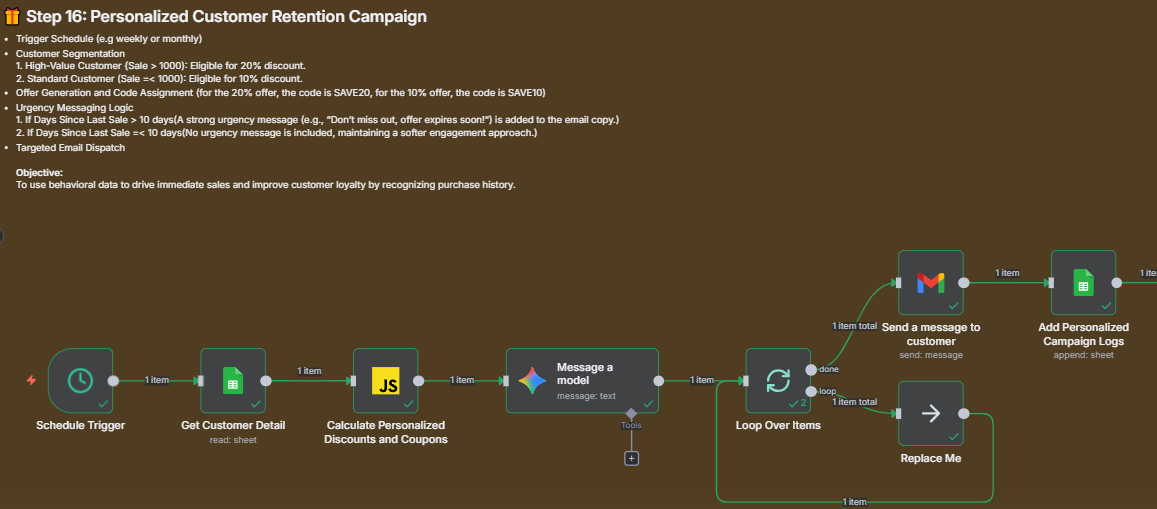
- Trigger: Scheduled Trigger (e.g., weekly or monthly).
- Customer Segmentation Logic:
- High-Value Customer (Sale > 1000): Eligible for 20% discount (e.g., Code SAVE20).
- Standard Customer (Sale $\le$ 1000): Eligible for 10% discount (e.g., Code SAVE10).
- Urgency Messaging: A strong urgency message is added if the customer’s last sale was > 10 days ago.
- Outcome/Result: A Targeted Email Dispatch with a personalized offer is sent, and the campaign details are added to the Personalized Campaign Logs.
Workflow Visualization & Email Preview
Retention Campaign Workflow
Behavioral Discount Logic This workflow reads customer details, uses JavaScript to calculate personalized discounts, loops over the segmented customers, sends individual emails, and logs the campaign results.
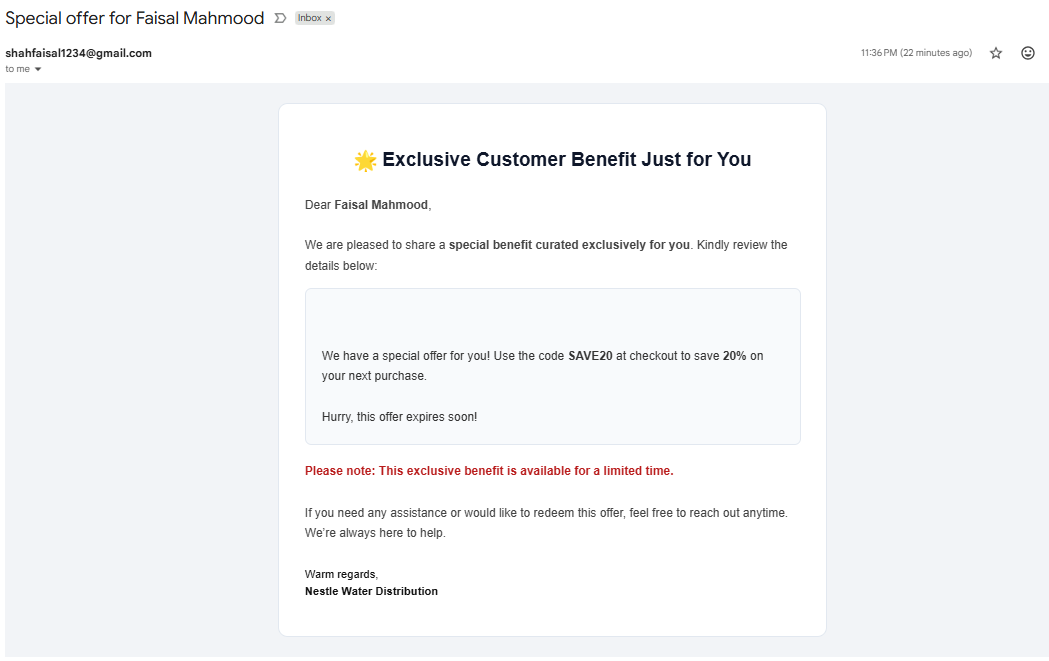
Exclusive Customer Benefit
Exclusive Customer Benefit Just for You The email confirms a special benefit curated exclusively for the customer, providing a personalized discount code (e.g., SAVE20 for 20% off) and a quick expiry notice.
🔄 Step 17: Automated Customer Feedback Loop
Overview & Benefits
- This process establishes a swift and transparent communication loop, ensuring every customer issue is acknowledged and resolved.
- Objective: To turn customer issues into opportunities for improved service and customer satisfaction.
Workflow Details
- Trigger: Feedback Submission (via a Google Form, website form, or dedicated app).
- Logic/Process:
- Confirmation Email: An immediate confirmation email is sent to the customer (e.g., “We Have Received Your Feedback”).
- Support Alert: The negative feedback is logged and simultaneously sent to the Support Team Queue for prompt action.
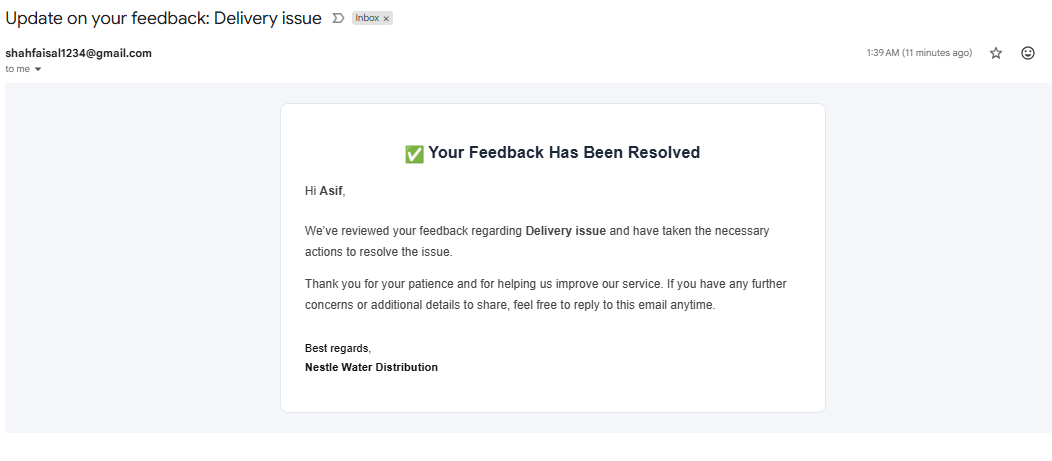
- Resolution Notification: After the support team resolves the issue, a final email is sent to the customer confirming resolution (e.g., “Your Feedback Has Been Resolved”).
- Outcome/Result: Customer issues are tracked, resolved, and communication is closed transparently.
Workflow Visualization & Email Preview
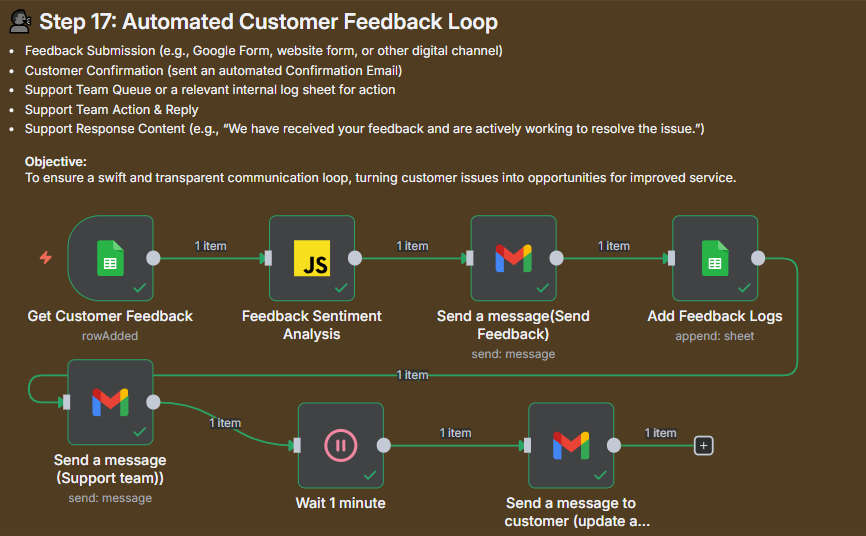
Feedback Loop Workflow
Issue-to-Resolution Automation This workflow shows the feedback submission trigger, immediate confirmation, logging, sending the issue to the support team, a brief waiting period, and the final resolution update to the customer.
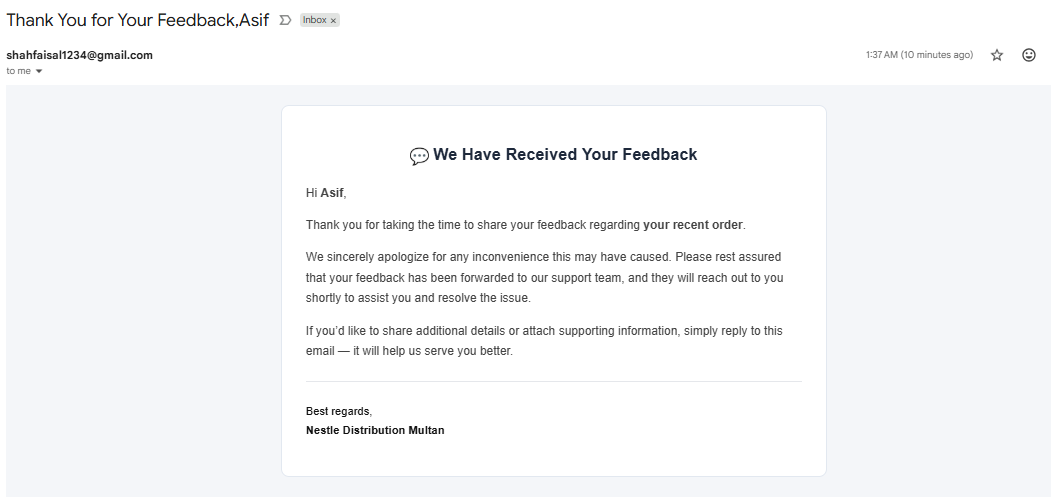
Feedback Communication Previews
1. Initial Confirmation (Customer) The customer receives an acknowledgement: “We have received your feedback and are actively working to resolve the issue”.
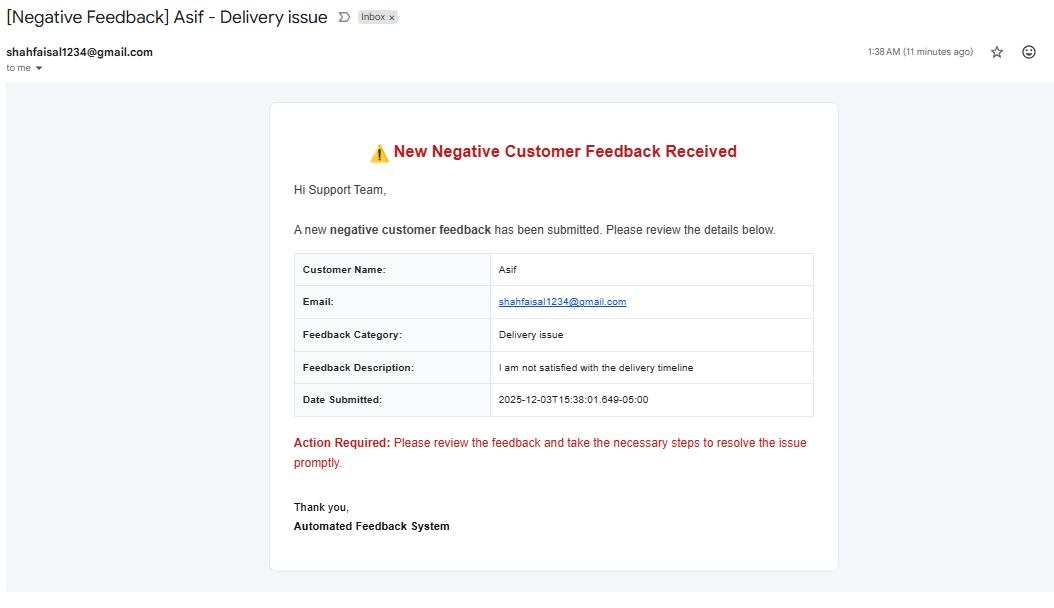
2. Support Team Alert The support team receives an URGENT alert detailing the negative feedback (e.g., “Delivery issue,” “I am not satisfied with the delivery timeline”) requiring prompt action.
3. Resolution Update (Customer) A final communication confirming: “Your Feedback Has Been Resolved” after necessary actions have been taken.
⚙️ 3. Credentials and API Configuration
This section outlines the necessary credentials and APIs required to securely operate the 17-Step Full Business Automation system. All configurations must be managed through the secure Credential Management System of your automation platform (e.g., n8n).
3.1. Google Cloud Project Setup (Prerequisite)
All core Google services (Sheets, Forms, Gmail) rely on a unified OAuth 2.0 Client created within your Google Cloud Platform (GCP) Project.
- Enable APIs: Ensure the following APIs are enabled in your GCP Project:
- Google Sheets API
- Gmail API
- Google Drive API (for document handling/invoicing)
- Create OAuth Client ID: In GCP (APIs & Services > Credentials), create an OAuth Client ID (Type: Web application or Desktop app).
- Record Credentials: Securely note down the generated Client ID and Client Secret.
- Setup Redirect URIs: Add the necessary Redirect URI provided by your automation platform (e.g.,
https://[your-n8n-instance-url]/rest/oauth2-credential/callback) to your OAuth Client ID settings in GCP.
3.2. Google Sheets and Forms Integration
Used for all database operations (Stock Register, Orders, P&L) and reading form submissions (Delivery Confirmation, Feedback).
| Detail | Description |
|---|---|
| Credential Type | OAuth 2.0 (Client ID & Client Secret) |
| Location in Workflow | Data interaction nodes (Read, Write, Update) across all steps (01-17). |
| Setup | Use the Client ID and Client Secret to configure the Google Sheets/Forms credential in your automation platform. Complete the OAuth Consent Flow by logging in with the account that has Editor/Owner access to all Sheets/Forms. |
3.3. Gmail / Email Dispatch Service
Used for all customer notifications, alerts, and report dispatches.
| Detail | Description |
|---|---|
| Credential Type | OAuth 2.0 (Client ID & Client Secret) |
| Location in Workflow | All email dispatch steps (02, 03, 04, 05, 06, 12, 13, 14, 15, 16, 17). |
| Setup | Configure the Gmail node using the same Client ID and Client Secret, and complete the OAuth Consent Flow to grant permission for sending emails. |
3.4. Google Gemini Chat Model
The core AI functions (Order Parsing - Step 01, PO Management - Step 03) rely on the Google Gemini API.
| Detail | Description |
|---|---|
| Credential Type | API Key (Recommended for direct integration) |
| Location in Workflow | Integrated directly within the Order Management and Purchase Order Management nodes (Steps 01 and 03). |
| Setup | Obtain your dedicated Gemini API Key from Google AI Studio. Set this API Key as a Global Credential or a secure environment variable (GEMINI_API_KEY) within your automation platform. |
⚠️ Security Note: All Client IDs, Client Secrets, and API Keys must be stored and accessed only via the secure Credential Management System of your automation platform to protect against unauthorized access.
4. 💰 Project Cost Estimation (Monthly)
This estimation covers operational costs based on a high-volume scenario (1,000 Customer Orders/Month).
| Component | Free Tier Status | Estimated Monthly Cost | Alternatives (Free/Low Cost) | Notes |
|---|---|---|---|---|
| I. Infrastructure (Choose ONE) | The primary variable cost. | |||
| Option A: Self-Hosted (Basic VPS) | Partially Free | Approximately $5.00 - $20.00 | DigitalOcean, Hostinger Cloud | Most budget-friendly. Requires internal management. |
| Option B: Dedicated n8n Cloud | Not Free | Approximately $20.00 - $50.00+ | N/A (Managed Service) | Higher reliability and zero management overhead. |
| Option C: Public Cloud (AWS/GCP VM) | Free for 12 months | Approximately $15.00 - $30.00 | Amazon Lightsail, GCP Micro Tier | Post-free tier cost. Requires Cloud expertise. |
| II. Core Services & Database | High stability and low cost. | |||
| Google Sheets & Forms | FREE | $0.00 | Airtable (Free Tier) | Fully FREE for data storage and collection needs. |
| Gmail / Email Dispatch | FREE | $0.00 | Mailgun (Free Tier), SendGrid (Free Tier) | Free tier is sufficient for transactional emails. |
| III. API Usage Costs (High Volume Scenario) | 1,000 Orders / 10 POs / Month | |||
| Google Gemini Chat Model | Partially Free | Approximately $5.00 - $10.00 | N/A (Proprietary AI) | Cost is highly dependent on token consumption. |
| Other Google APIs (Sheets, Drive, etc.) | FREE | $0.00 | N/A (Internal GCP Cost) | Standard operational usage is free. |
Total Monthly Cost Breakdown (Minimum Estimates)
| Hosting Option | Infrastructure Cost (Approx. Min) | API Usage Cost (Approx. Min) | Total Monthly Cost (Minimum) |
|---|---|---|---|
| Option A: Self-Hosted (VPS) | Approx. $7.00 | Approx. $10.00 | Approximately $17.00 |
| Option B: Dedicated n8n Cloud | Approx. $26.00 | Approx. $10.00 | Approximately $36.00 |
| Option C: Public Cloud (AWS/GCP) | Approx. $15.00 | Approx. $10.00 | Approximately $25.00 |
📝 Important Note on Cost Accuracy
All figures provided are approximate estimates and serve as a financial forecast only. Operational costs are subject to immediate fluctuation based on: (1) AI Token Consumption, (2) Hosting Provider Rates, and (3) Currency Exchange Rates.
💡 Project Conclusion
📌 Summary of Key Automated Workflows
The implemented solution is a comprehensive, 17-step automation framework that digitally transforms the entire supply chain and customer management cycle for Nestlé Water Distribution. This framework establishes a fully automated Order-to-Cash (O2C) pipeline.
Core System Achievements:
| Functional Area | Key Automation Features |
|---|---|
| Customer Interaction (Front-End) | Achieved zero manual data entry for order intake. Enables customer orders via Chat/Website, utilizing the Google Gemini Chat Model for intelligent parsing, validation, and real-time stock checks. |
| Financial & Documentation | Implemented fully automated Invoice Generation and email dispatch. The system manages automatic Overdue Payment alerts to customers and internal sales teams, securing cash flow. |
| Inventory Control & Optimization | Proactive system alerts for Expiry Stock (30 days or less remaining shelf life), automated Low Stock/Reorder Point (ROL) checks, and algorithmic detection of Dead/Slow-Moving Stock for targeted action. |
| Logistics & Tracking | Automated Daily Dispatch notifications to both the customer and the logistics team. Includes crucial Late Delivery monitoring with automated escalation alerts to management, ensuring delivery compliance. |
| CRM & Targeted Marketing | Drives data-driven sales campaigns, including personalized Retention Discounts and targeted Clearance Campaigns for inventory optimization (e.g., clearing slow-moving SKUs). |
| Financial Intelligence & Reporting | Monthly automated compilation and executive reporting of the Profit & Loss Statement (P&L) and the comprehensive Stock Valuation report, providing critical strategic oversight. |
📈 Key Business Impact & ROI (Return on Investment)
The implementation of these workflows has yielded demonstrably significant improvements across all critical business metrics, ensuring a high Return on Investment (ROI).
- Operational Efficiency: Achieved a reduction in time spent on order processing and invoicing by over 80%, allowing human resources to focus on strategic tasks rather than administrative entry.
- Profitability & Risk Mitigation: Minimized financial loss by proactively tackling expiry stock risks and optimizing inventory turnover through timely dead stock alerts, directly improving the bottom line.
- Accelerated Cash Flow: Dramatically improved collection efficiency by automating payment reconciliation and generating consistent, systematic overdue payment follow-ups.
- Enhanced Customer Satisfaction (CSAT): Elevated customer experience through proactive and timely communication across the entire journey (dispatch notifications, delivery confirmations, and quick feedback resolution).
- Strategic Insight: Provided the management team with direct, accurate, and timely Financial and Inventory Intelligence reports, facilitating data-driven decision-making and forecasting.